michaelt5330502
Known Participant
February 13, 2016
Question

C# Get Text from Larger Text

  • February 13, 2016
  • 1 reply
  • 735 views

Below is an example C# code to put in Content to a paragraph.

            InsertionPoint ip = textFrame.ParentStory.InsertionPoints[-1];

            ip.Contents = "This is an InDesign Table conversion test: Header1\tHeader2\rCell1\tCell2";

            Text text = ip.Texts.FirstItem();

What I want to figure out is how would I extract the right part of the text starting after the ":"?
I want to extract it as a "Text" object, or any other compatible object so I could use the function "ConvertToTable".
i.e:

Text subText = ...//Somehow get the the text after the ":"
Table aTable = subText.ConvertToTable("\t", "\r");

So using C# text.ItemByRange(x,x) doesn't really work since it returns a InDesign "Objects" in C#, which is basically an array.
The "Objects" doesn't have a "ConvertToTable" method.


The "Objects" class has below properties and methods:
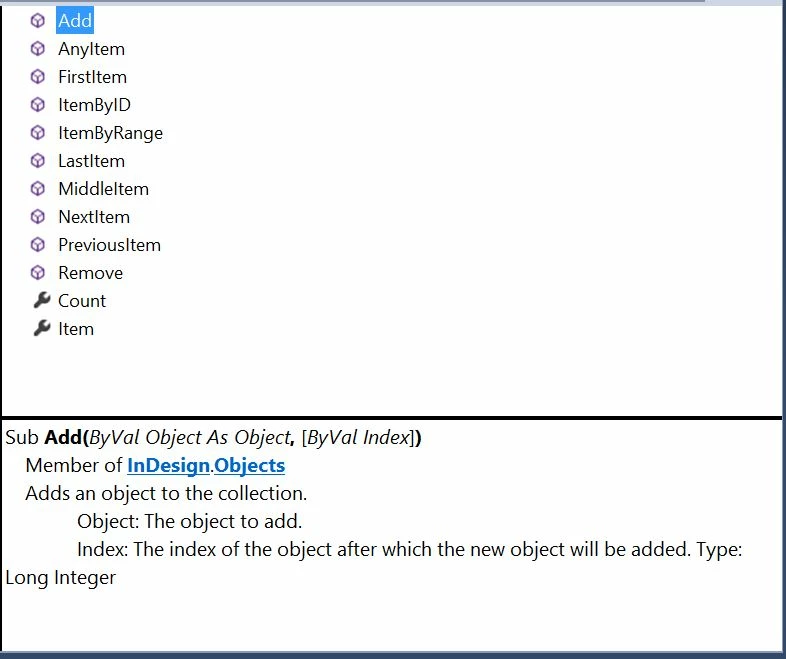
Doesn't seem like there's a way to convert a collection of "Objects" to a "Text" object.
I've tried to convert "Objects" to "Text" as the following, but it fails on me:

Objects objects = text.Characters.ItemByRange(43, -1);

Text subText = (Text)objects;

This topic has been closed for replies.

1 reply

TᴀW
Legend
February 13, 2016

Not sure about C#, but in JS you would indeed use itemByRange for this. It's doesn't quite return an array, but a collection object, which has all the properties of and methods of a text object. For example, if you've got the text cursor inside a paragraph in InDesign, the following:

t = app.selection[0].paragraphs[0];

t1 = t.insertionPoints.itemByRange(3,10);

t1.convertToTable();

... will convert the specified range to a table.

id-extras.com | InDesign tools & scripts for typesetters, form designers, and translators
michaelt5330502
Known Participant
February 13, 2016

That's also what I expected for the C# "Objects", to have a "ConvertToTable" property, or some way to convert it to "Text" like JavaScript has.
But looking at the C# API (see screenshot), it doesn't have a "ConvertToTable" function, unfortunately.

It seems terribly limited.

TᴀW
Legend
February 13, 2016

Despite what it says, it's worth trying to see if it works, if you haven't already.

id-extras.com | InDesign tools & scripts for typesetters, form designers, and translators