

dublove
Legend
Nov 12, 2026 2:11 PM UTC
Question

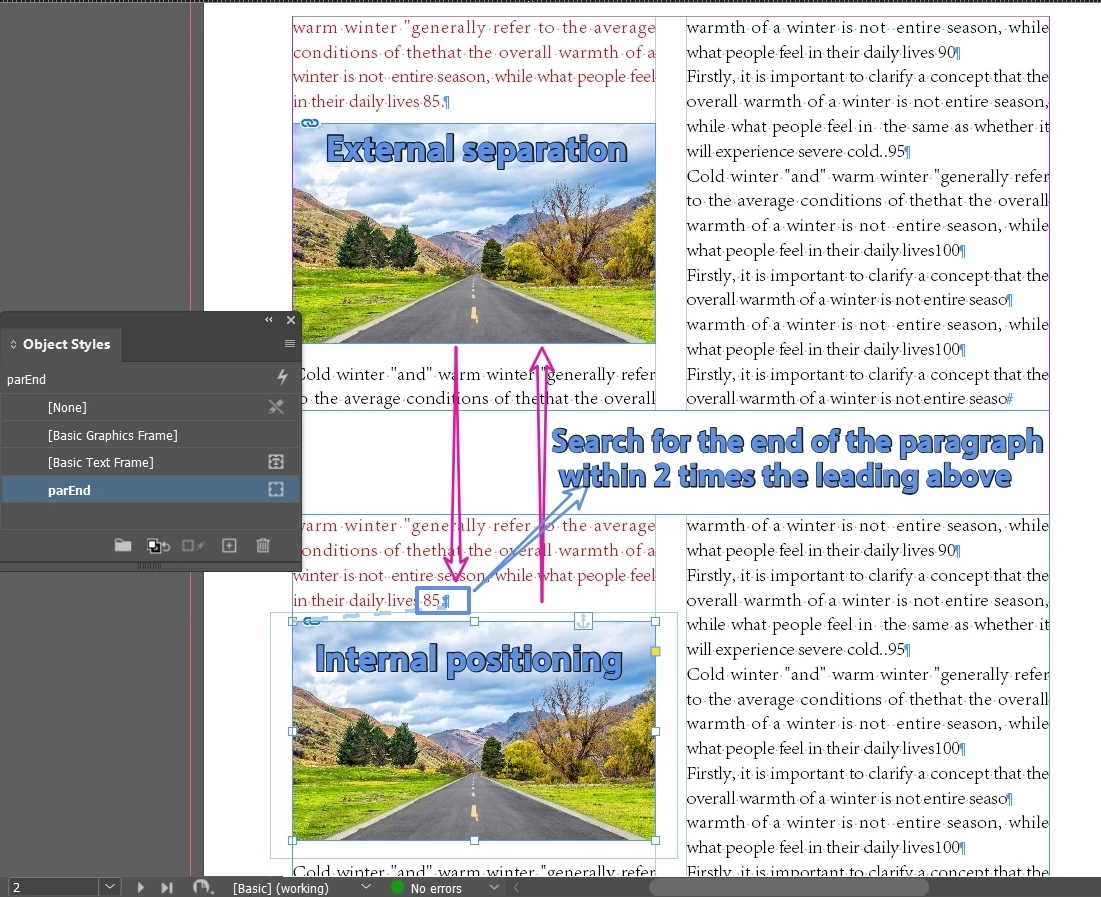
Can a script be used to switch between the "internal positioning" and "external separation" states of the image?

Hello everyone.

Sometimes some images are difficult to layout and need to be switched to another way.

If the image is outside, I want to position it at the end of the paragraph closest to the top of the image (within 2 times the leading, otherwise give up).
The specific position after positioning is controlled by object style.


If the image is already in a positioning state. After separation, paste it in its original position.

Thank you.
 

    1 reply

    CORCTON34033231
    Community Expert
    Community Expert
    Nov 12, 2026 6:21 PM UTC

    Hi — yes, this can be scripted, but there is no single built-in command that flips an image between anchored and free; the two directions need different techniques:

    Anchored → free (release): use pageItem.releaseAnchoredObject() — it releases a custom-positioned anchored object and the object stays where it is on the page. One important caveat, confirmed by Community Expert Uwe Laubender in this solved thread: https://community.adobe.com/questions-671/release-all-anchored-objects-at-once-882957 — releaseAnchoredObject() does not work for Inline or Above Line anchored objects; it fails silently, with no error. For those, the reliable workaround is to duplicate() the anchored object, delete the original, and keep the duplicate — it lands as a free object in the same place.


    Free → anchored: the scripting DOM has no “anchor this object” method. The scripted equivalent of the manual workflow is to cut the object and paste it at the target insertion point — it comes back as an inline anchored object — then set its anchoredObjectSettings (anchoredPosition = AnchorPosition.ANCHORED for a Custom position, plus the reference points and offsets), or re-apply your object style, which carries the Anchored Object Options. Adobe’s guide to the three position types (Inline / Above Line / Custom) and to releasing an anchor: https://helpx.adobe.com/indesign/desktop/add-graphics-and-media/transform-and-arrange-objects/create-position-anchored-objects.html


    Choosing the anchor point (end of the paragraph closest to the top of the image, within 2× the leading, otherwise give up) is custom logic the script has to implement — compare the image’s top edge (geometricBounds) with the paragraphs’ positions in the text frame and pick the nearest one. There is no built-in option for that rule.

    So: feasible, but it is a custom script built from those pieces rather than a one-liner.


    Translate