



Roger Breton
Legend
October 26, 2024
Question

Can I Apply Object Styles to Change Frame Size Without Resizing Images in InDesign?

  • October 26, 2024
  • 2 replies
  • 388 views

This is a newbie kind of question. 
I'm just trying to dab into Object Styles but I have not found the expected InDesign documentation with regards to this feature? Sorry for the French UI but this what I'm using :
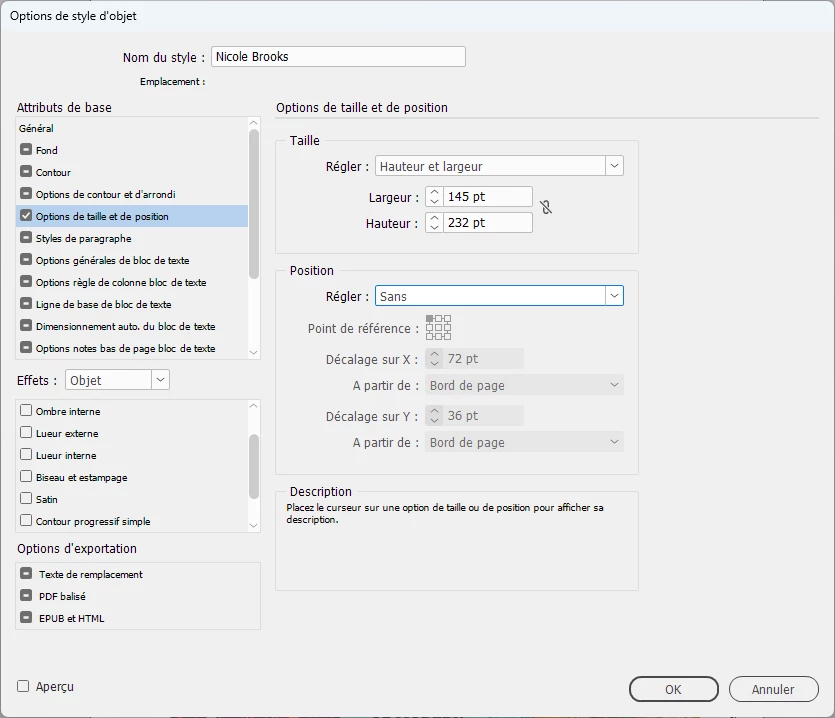
All I want is to "store" the width and height of an existing picture frame to apply to other picture frames in my page. But as soon as I apply the style to any of the frames I'm trying to change the size of, the placed image gets "resized", proportionaly? I don't want the scale of the contained images to change. All I want to do is to change the size of the picture frames themselves.


But I guess this is not a job for Object styles?
I know how to do this without using Object Styles. I was just curious to find out whether Object styles coule do the job easier.

Thank you in advance for you kind help and please excuse my ignorance.


<Title renamed by MOD>

This topic has been closed for replies.

2 replies

Robert at ID-Tasker
Legend
October 26, 2024

What do you have in Frame Fitting Options:


Roger Breton
Legend
October 26, 2024

Believe it not, I had "Nothing" -- it was all grayed out :

Somehow, as you can see in the screen capture, I have a lot of tabs "checked"? 

Even if I uncheck them all, except Size, the next I try to edit the Style again, they are all checked again!!
....
I wish I could "better" understand how Object styles worked but Adobe's documentation is less than minimal.

Roger Breton
Legend
October 26, 2024

Watched a video on YouTube and tried to turn off the "Fitting options" to no avail.

One thing weird I notice is that, everytime I double-click on the style name to edit it, all its options are turned back on?
Even though I unchecked them all (Except the one regarding Size) originally. I'm on Windows and this could be a known bug? I'm not v20 yet.

But here is what I found. While experimenting with applying the styles to objects, I noticed that "None" having a little "+" next to its name?

I tried "resetting" the None style and then apply my custom object style and it worked!!! By golly.,