


Can I calculate numbers in an InDesign table?
I would like to be able to calculate row- and column totals automatically within InDesign if this is possible.
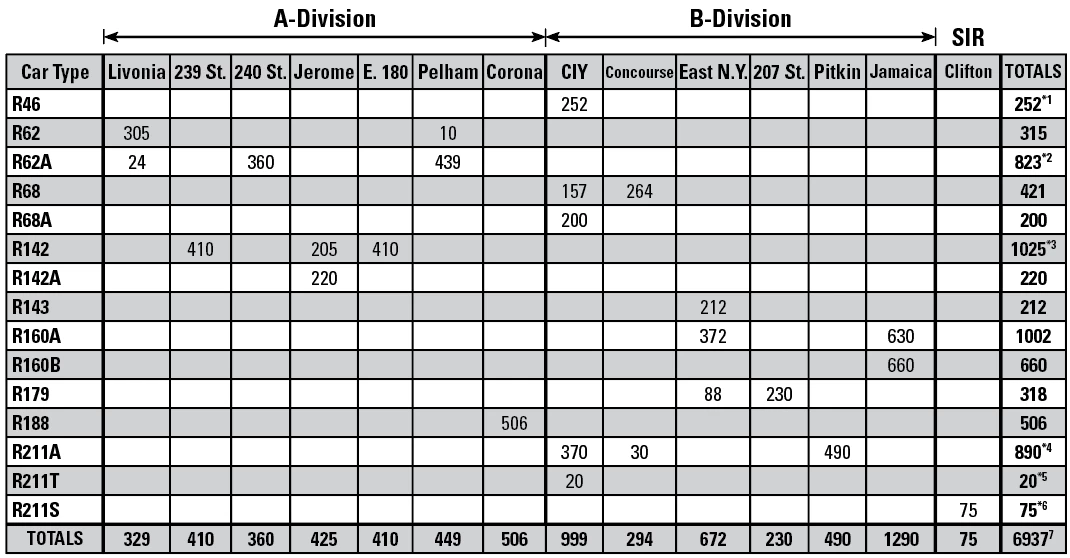
One one page of a large/complex document I have one table formatted exactly the way I want it to look, with numerical values that update regularly. There are column headers along the top, row headers on the left, column totals on the bottom, row totals on the right, and the grand totals in the bottom-right cell. All the cells inside the table contain only numbers or no data. The row totals on the right also require footnote references (*1, etc) that are detailed in text below the table.
For the last 25 years I’ve just been updating the numbers manually and using a calculator, but I have made mistakes on occasion. I’d rather not mess with Excel and importing/linking/etc; just a very simply way to add top-to bottom and left-to-right. Is it possible to do this? Please and thanks. Here is the table.

 AdChoices