Answered
Can I make numbers in TOC be the same width?
Hi
Is it possible to make numbers the same width in Indesign?
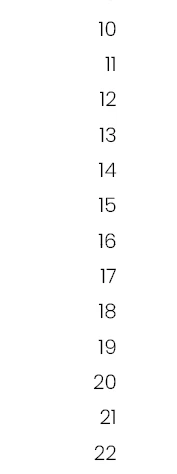
I have a TOC where I would like the numbers to have the same width, in the example 11 and 21 does not look good.

Hi
Is it possible to make numbers the same width in Indesign?
I have a TOC where I would like the numbers to have the same width, in the example 11 and 21 does not look good.
Pro Fonts have in OpenType several number types. Choose one tabular font type.
If the choosen font does not include those, choose another font, create a character style with tabualr numbers and chosse that in the toc setup for page number.
Already have an account? Login
No account yet? Create an account
Enter your E-mail address. We'll send you an e-mail with instructions to reset your password.


 AdChoices