Participant
June 26, 2019
Answered

Can I span images/ graphics across two spreads?

  • June 26, 2019
  • 3 replies
  • 935 views

Hi there,

Have tried to find a solution to this to no avail.

Using InDesign 2019 CC.

I'm hoping to make graphics span across multiple spreads. So essentially how when you have a bunch of pages when you make an element in one and expand it past the bounds (top to bottom) it won't go to the next part. And the gap between the two makes it near impossible to eyeball properly.

Is there any way to have objects and images cross this border and be seamless to the next spread?

Essentially I am designing a presentation this is a printed book but also going to be a website that scrolls from top to bottom.
This topic has been closed for replies.
Correct answer winterm

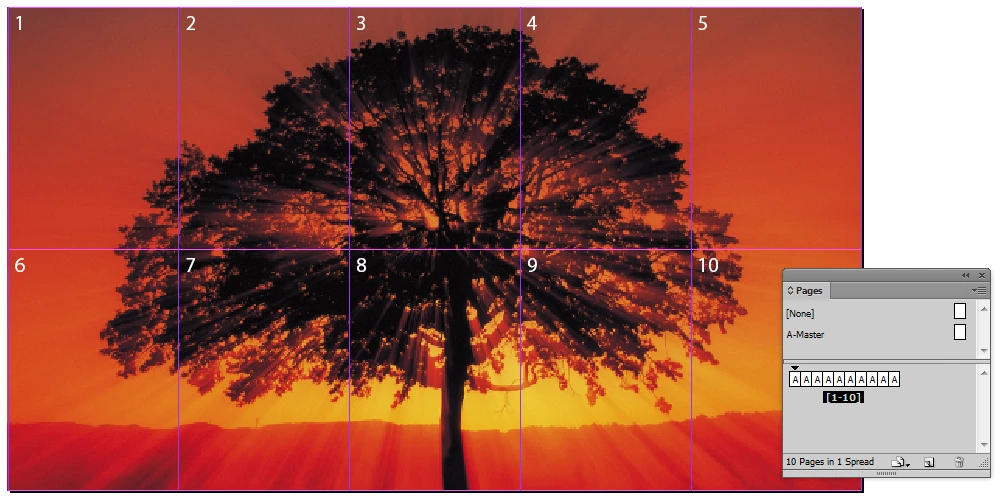
A short answer would be: nope, you can't. You're restricted to a single spread. However, spread can contain up to 10 pages. Here's how it may look in InDesign (don't allow spread to shuffle, and use Page tool to compose pages in spread):

and exported pdf (thumbnails view):

3 replies

Peter Villevoye
Community Expert
Community Expert
June 27, 2019

No, you can't.

You need to position the same image but with a different crop on each spread.

You can use Grant H​ excellent tip to prepare the crops of the image, as shown in the video.

And you can make the gap much smaller under the Guides and Pasteboard section in the Preferences:

InDesign is not a proper tool for doing web design. In fact, no application can serve as a print and web design tool simultaneously. These are two different worlds. At best, you might find some comfort in using IN5 from Ajar Productions.

Grant H
Community Expert
Community Expert
June 27, 2019

you could create a second ID file here is a vid to explain:

photos across spreads - YouTube

/g

winterm
wintermCorrect answer
Legend
June 26, 2019

A short answer would be: nope, you can't. You're restricted to a single spread. However, spread can contain up to 10 pages. Here's how it may look in InDesign (don't allow spread to shuffle, and use Page tool to compose pages in spread):

and exported pdf (thumbnails view):

Willi Adelberger
Community Expert
Community Expert
June 27, 2019

It works only with non-facing (single sided) pages.

winterm
Legend
June 27, 2019

… and this is a limitation of our Universe, not InDesign.

Simple exercise for designer: draw four lines, when each of the four is perpendicular to other three.

3D world is not enough for this