
Participating Frequently
July 30, 2022
Answered

Can I turn this pop up off?

  • July 30, 2022
  • 4 replies
  • 1731 views

Hi.

I've been using InDesign for a long time, but just today something started happening that has never happened before. I'm not sure if I enabled something by mistake, or if it was part of an update. 


Before, when I placed an EPS file I just pressed CTRL+D >> Selected my file, Then placed it on my InDesign page. 


But now/today When I select the EPS file I get a popup (see attached) Asking me about EPS Import Options. I don't want to see this or need it.
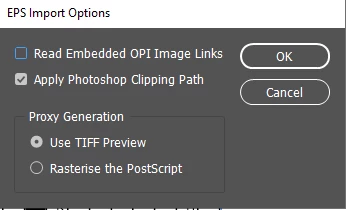


I know I can cancel it, but I've built a really big automated script to help me build my books and this new pop up is breaking the flow and stopping it from working


How can I turn this off?

This topic has been closed for replies.
Correct answer jmlevy

This dialog box appears because you have ticked the “show import options”. Untick it and you won't see it anymore. But you should stop to import eps files. Use either PSD, or JPEG or PDF, or AI files.

4 replies

Community Expert
August 1, 2022

"… I know I can cancel it, but I've built a really big automated script to help me build my books and this new pop up is breaking the flow and stopping it from working"


Hi @David25117528512j ,

if you place an image or graphic by scripting the option will not pop up.

This option is turned off by default, e.g. when the parameter in the method is not used.


place( myEPSfile )

will not invoke the option.


place( myEPSfile , true )

will invoke the option.


See DOM documentation for ExtendScript with InDesign:

https://www.indesignjs.de/extendscriptAPI/indesign-latest/#Rectangle.html#d1e217417__d1e220961


Regards,
Uwe Laubender
( Adobe Community Professional )

Barb Binder
Community Expert
Community Expert
July 30, 2022

Hi @David25117528512j:


It's just a really old file format.  This article, entitled "EPS – the Zombie among File Formats" was written by one of our ACP colleagues, in 2016. 

https://community.adobe.com/t5/adobe-community-professionals-discussions/eps-the-zombie-among-file-formats/td-p/4785276


That said, if it is the only output option for the tool that you are using, I'm not sure what the alternative would be, other than changing tools. We don't want to make your workflow more complicated.


~Barb

~Barb at Rocky Mountain Training
Legend
July 31, 2022

There would be no point opening EPS and resaving. When people say avoid EPS, they mean avoid completely, not just for placing in InDesign. You'd need to find a different tool. Still, if you use this as your standard, you probably know the limitations (like poor colour matching) and don't need transparency. I would not be surprised, though, if one day Adobe drop EPS support. 

Barb Binder
Community Expert
Community Expert
July 30, 2022

I've marked @jmlevy's answer as correct. But in case you weren't sure where to find the checkbox, it appears at the bottom of the File > Place dialog box. Just turn it back off again.


~Barb


P.S. He's right about moving away from .eps files, too. 😊


~Barb at Rocky Mountain Training
Participating Frequently
July 30, 2022

Thanks for the replies.. 


Just wondering why I shouldn't use EPS? 

One of my tools only outputs in EPS,, so I use them. It outputs over 300 different files.. So opening them in Illustrator and resaving to something else would take a long time. What are the benefits of doing it? Why are EPS file bad?


Willi Adelberger
Community Expert
Community Expert
July 31, 2022

Drag then ocer the Distiller. hat covert them to PDF. As EPS have no transparency you do not loose that aspect. Use a setting which will not recalculate any resolution, a setting which will embed all fonts.

jmlevy
Community Expert
jmlevyCommunity ExpertCorrect answer
Community Expert
July 30, 2022

This dialog box appears because you have ticked the “show import options”. Untick it and you won't see it anymore. But you should stop to import eps files. Use either PSD, or JPEG or PDF, or AI files.

Participating Frequently
July 30, 2022

Thanks for your reply

Where is the ticket box ?