dublove
Legend
August 20, 2025
Answered

Can scripts in ID be used to copy or delete files?

  • August 20, 2025
  • 3 replies
  • 1551 views

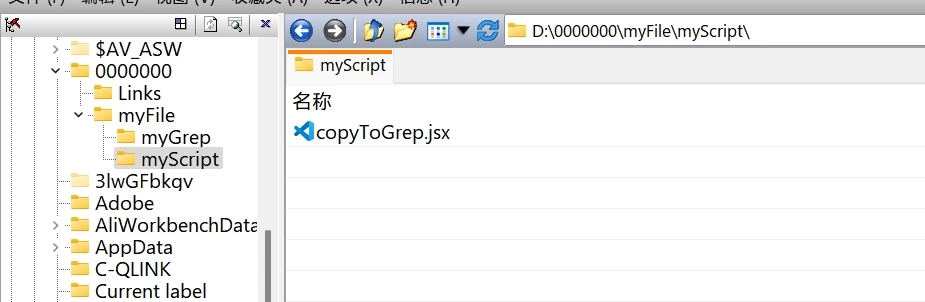
Suppose my script directory is:

..\myFile\myScript\copyToGrep.jsx

My regular expression directory is:

..\myFile\myGrep\aaa.xml

I want to copy aaa.xml to the GREP directory:

C:\Users\olo\AppData\Roaming\Adobe\InDesign\Version 19.0-J\zh_CN\Find-Change Queries\GREP

First clear the files in GREP, then copy. The version number 19.0 is automatically recognized.


Alternatively, if can open the specified directory in the script, which is also a good option.

Correct answer Laubender

If fuzzy matching isn't possible, that would be highly unscientific.
$.writeln(File(Folder.desktop + “/Screen Shot*.*”).exists)


Similarly, copy(); does not support copying folders.
This feature is really disappointing.
Still, it's sufficient for most needs.


@dublove said: "If fuzzy matching isn't possible, that would be highly unscientific.
$.writeln(File(Folder.desktop + “/Screen Shot*.*”).exists)"


Matching is possible, but not in the way you tried it.


Let's suppose there is a folder on your Desktop named "ScreenShots" containing, amongst other files and folders, also files where the name starts with "Screen Shot …" you could supply a filter function to getFiles() to part files from folders and match only files where the name begins with "Screen Shot".


For example:

var myFolder = Folder( Folder.desktop +"/"+ "ScreenShots" +"/" );

var myFileListArray = myFolder.getFiles
( 
	function(file)
	{  
			
		if
		( 
				
			file instanceof File 
				
			&& 
				
			decodeURI( file.name ).match( /^Screen Shot/ )
				
			&&
				
			!file.hidden
			
		)
			
		return true 
			
	}  
);

alert( myFileListArray.length );

 

3 replies

Community Expert
August 20, 2025

Well, also see the following reply to get the name of the machine on Windows or macOS (just in case):


How to get the windows username in jsx
கற_பன___Imagine_, Nov 11, 2011
https://community.adobe.com/t5/indesign-discussions/how-to-get-the-windows-username-in-jsx/m-p/3555322#M313615


Regards,
Uwe Laubender
( Adobe Community Expert )

Community Expert
August 20, 2025

"Can scripts in ID be used to copy or delete files?"

Hi @dublove ,

yes. So be very careful what you are doing.

( The right soundtrack to this:  https://www.youtube.com/watch?v=V-HYayT1vwg&list=RDV-HYayT1vwg&start_radio=1 )


C:\Users\olo\AppData\Roaming\Adobe\InDesign\Version 19.0-J\zh_CN\Find-Change Queries\GREP

"I don't know how to get the “olo” here, and Version 19.0-J may also be Version 20.0-J."


See:

Writing an InDesign script to identify users
Laubender, Mar 26, 2020

https://community.adobe.com/t5/indesign-discussions/writing-an-indesign-script-to-identify-users/m-p/11008012#M180409


And with ExtendScript there is no need to use backslashes in folder or file paths. Slashes will do.

On macOS and Windows.


Regards,
Uwe Laubender
( Adobe Community Expert )

dublove
dubloveAuthor
Legend
August 20, 2025

How to obtain “Version 19.0-J”
This is not version number 19.5.

I have asked the following questions.
However, I still cannot directly obtain “Version 19.0-J.”

alert(app.scriptPreferences.version);
alert(app.scriptPreferences.scriptsFolder.parent.parent);
alert(app.scriptPreferences.scriptsFolder);

How to get the path of the regular?
C:\Users\adm\AppData\Roaming\Adobe\InDesign\Version 19.0-J\zh_CN\Find-Change Queries\Text


There are also shortcuts stored in the path
C:\Users\adm\AppData\Roaming\Adobe\InDesign\Version 19.0-J\zh_CN\InDesign Shortcut Sets


Workspace Path
C:\Users\adm\AppData\Roaming\Adobe\InDesign\Version 19.0-J\zh_CN\Workspaces


PDF Export Template Path
C:\Users\adm\AppData\Roaming\Adobe\Adobe PDF\Settings

Community Expert
August 20, 2025

Hi @dublove ,

what do you get with:

alert(app.scriptPreferences.scriptsFolder.parent.parent.parent.name);


or the whole path with:

alert(app.scriptPreferences.scriptsFolder.parent.parent.parent.fsName);


Regards,
Uwe Laubender
( Adobe Community Expert )

m1b
Community Expert
Community Expert
August 20, 2025

Hi @dublove, here is a generic function to copy a file from `sourcePath` to `destinationPath`.

- Mark


/**
 * @file Copy File Example.js
 * 
 * Example copying the active document file
 * to the desktop named "copy.indd".
 * 
 * @author m1b
 * @version 2025-08-20
 */
(function () {

    if (0 === app.documents.length)
        return alert('Please open a document and try again.');

    var activeDocPath = String(app.activeDocument.fullName);
    var copyToPath = Folder.desktop + '/copy.indd';

    var copiedFile = copyFile(activeDocPath, copyToPath);

})();

/**
 * Copies a file at `sourcePath` to `destinationPath`.
 * @author m1b
 * @version 2025-08-20
 * @param {String} sourcePath - the source path.
 * @param {String} destinationPath - the destination path.
 * @returns {File}
 */
function copyFile(sourcePath, destinationPath) {

    var f = File(sourcePath);

    if (!f.exists)
        throw new Error('File not found: "' + sourcePath + '".');

    var dup = File(destinationPath);

    f.copy(dup);

    return dup;

};
dublove
dubloveAuthor
Legend
August 20, 2025

I think I understand a little bit.
The difficulty may be obtaining the path.
C:\Users\olo\AppData\Roaming\Adobe\InDesign\Version 19.0-J\zh_CN\Find-Change Queries\GREP
I don't know how to get the “olo” here, and Version 19.0-J may also be Version 20.0-J.


It might be more practical to open the directory.
Then, manually copy and delete.