
Participant
December 22, 2016
Answered

Can't add colour to line stroke?

  • December 22, 2016
  • 2 replies
  • 1411 views

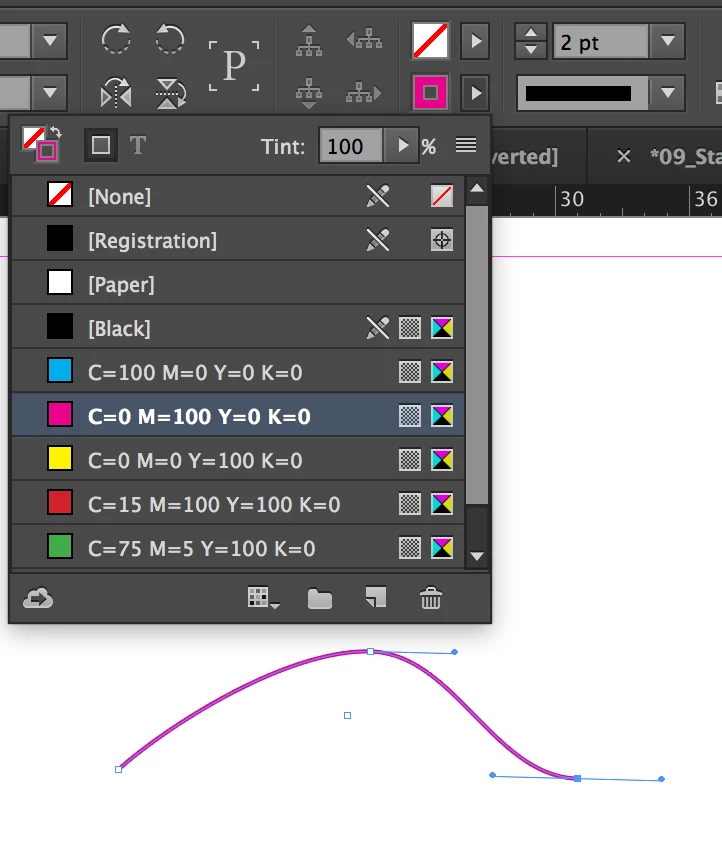
Hi, I can't seem to add colour to lines I have drawn using the pen tool. I select (also have dried direct select) and open the colour panel, choose a colour, but the line remains black. There is no colour option in the stroke panel.  When I try to add colour to a curved line using the same steps, the colour fills the spaces surrounding the curve but the stroke line remains black. Any suggestions?
    Correct answer jane-e

    Can you post a screen shot? What is the weight of your stroke?

    And, to confirm, you are selecting a stroke color, and not a fill color, correct?

    2 replies

    Barb Binder
    Community Expert
    Community Expert
    December 22, 2016

    the colour fills the spaces surrounding the curve but the stroke line remains black.

    This means that you are selecting the Fill color and not the Stroke Color. There are so many ways to assign colors in InDesign. Jane is showing you the two options on the Control panel, which I think is easiest for a new user, because there is a menu for Fill and one for Stroke.

    If you opt to use the Swatches or Colors panel, pay close attention to the widget in the top left corner. There are two overlapping buttons, and one is always on top of the other. The one on top controls whether the color is assigned to the fill, or to the stroke.

    Stroke on top vs Fill on top:

    ~Barb at Rocky Mountain Training
    jane-e
    Community Expert
    jane-eCommunity ExpertCorrect answer
    Community Expert
    December 22, 2016

    Can you post a screen shot? What is the weight of your stroke?

    And, to confirm, you are selecting a stroke color, and not a fill color, correct?

    freofanAuthor
    Participant
    December 22, 2016

    Thanks, this has solved the problem! I missed the fill/stroke toggle--it's well hidden.

    jane-e
    Community Expert
    Community Expert
    December 22, 2016

    Agreed! It is easy in the Control panel, not in the Swatches or Tools panel. By the way, "X" is the shortcut to toggle the Fill and Stroke as to which is in the front.

    Be sure to mark one of these answers correct to close the thread, and I'm glad you are on your way!

    Best,

    Jane