
Participant
February 18, 2019
Answered

Can't copy/paste from Illustrator to Indesign (CC2019)

  • February 18, 2019
  • 1 reply
  • 8138 views

Hi everyone

I have a problem with copy/paste from Illustrator to Indesign stopped working.

I copy a vector from Illustrator and when I try to paste to Indesign, the "wait" wheel starts rolling and goes on for about 40 seconds and after that nothing is pasted.

I've already tried the following:

  • Restart both apps
  • Restart the computer
  • Delete preferences in both apps
  • Uninstall both apps and reinstall again
  • Copy/paste works from indesign to illustrator but not the other way
  • Copy/paste works from Illustrator to Photoshop for example
  • Copy/paste text works, but not if I copy/paste the text box itself
  • I've tried to copy from more than one Illustrator doc and into more than one indesign docs

Has anyone had the same problem?
This topic has been closed for replies.
Correct answer Steve Werner

Laubender

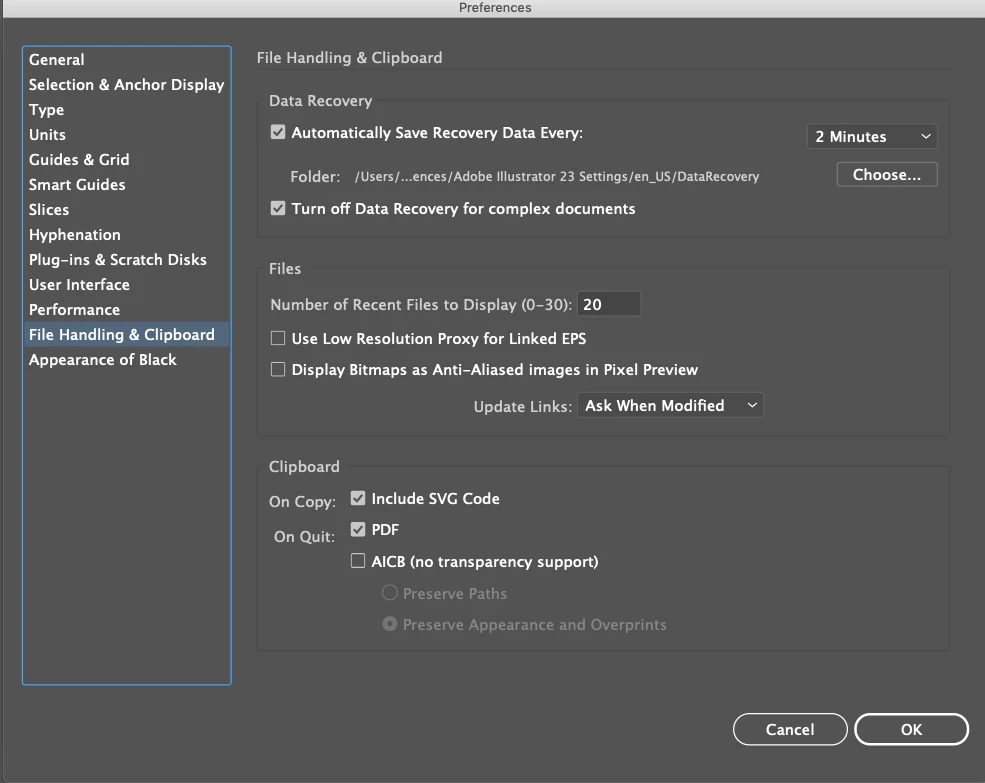
The "Include SVG Code" is selected. I tried deselecting it but it didn't change anything.

What I have noticed now is that both Illustrator and Indesign freeze for 40 secs when I try to copy/paste.


It's not a Mojave problem. I'm using InDesign CC 2019.0.1 version under macOS 10.14.3 and it copies and pastes quickly. Same settings as you.

It would be worth trying it in another user on your computer to make sure there isn't some kind of 3rd party or system corruption issue.

1 reply

Community Expert
February 18, 2019

Hi evahronn ,

what's your operating system?

Did you test with a simple rectangle selected in Illustrator?

Note: You'll need a fill color or a stroke weight defined.

Otherwise you'll get an error message if you try Paste with InDesign.

Regards,
Uwe

evahronnAuthor
Participant
February 18, 2019

Hi Laubender

I have a MacOs Mojave 10.14

Yes I tried a simple filled rectangle as well as a few version of vectored logos. Same thing happens.

Community Expert
February 18, 2019

Hm.

Look into Illustrator's preferences.

Is Including SVG Code disabled?

From my German Illustrator CC 2019 preferences on Windows 10:

Regards,
Uwe