
daniels59958
Participant
Nov 17, 2026 5:17 PM UTC
Answered

Can't edit GREP strings or create new GREP in an existing document.

(InDesign v22.0, Mac 26.6.2, Already updated, already restarted, already exported a “clean” IDML, etc.)

I have an existing document with lots of GREP styles. For some reason, I cannot create new GREP styles. When I try to do so, the document defaults to this: (See highlighted style at the bottom.)

What is even more peculiar is that if I promote the new style higher in the priority list, it swaps the character styles with the GREP style that was formerly in that position on the list. See the example below, where the new style has taken on “SUITS ICON WHITE” which was assigned to the style above it. 
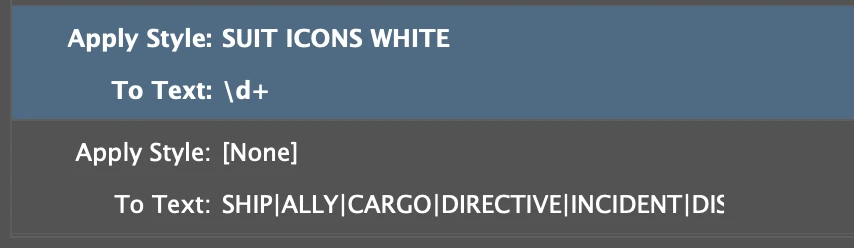
And finally, I cannot commit any edits in the text in any of the GREP styles. I can edit the text field, but none of the changes stick. They all default to their prior state.

I saw a similar question in a closed thread from six years ago without a resolution. Any luck more recently?

    daniels59958
    daniels59958Correct answer
    Participant
    Nov 17, 2026 9:33 PM UTC

    Hi Anubhav,

    Unfortunately this file uses some proprietary icon fonts I can’t share publicly. However, my team found a workaround solution:

    They found that deleting a GREP style was the only edit that InDesign would commit. So, they tried deleting every GREP except the one that we needed to edit and found that those edits were committing as they should. So that gave us our only lead in solving the mystery. Here is the process…


    1. They carefully documented and deleted one GREP style at a time.
    2. After each deletion, they tested editing the remaining GREP strings to see if those edits would commit. If it didn’t commit, they documented and deleted another GREP.
    3. They repeated this process until about five or six GREP styles were deleted. At that point, edits were committing as they should.
    4. With that functionality restored, they made the edits that we had wanted to make in the first place. (They did this while the GREP list was still trimmed down.)
    5. Finally they started adding back in the deleted GREPs in the paragraph style, which also seemed to work.

    So we don’t know what caused the error or how this process solved it. The mystery remains, but we managed to work around it. Hopefully this helps someone in the future!

    5 replies

    Joel Cherney
    Community Expert
    Community Expert
    Nov 17, 2026 10:02 PM UTC

    Have you tried resetting your preferences yet? I’ve not experienced this bug in particular (and I’m not planning on installing v22 until the first dot release) but I have seen similar GREP Style weirdness in the past, which was resolved immediately by a preferences reset. 

    Translate
    daniels59958
    Participant
    Nov 18, 2026 2:17 PM UTC

    I hadn’t tried that, but my team found a workaround solution here: 


    Translate
    daniels59958
    Participant
    Nov 17, 2026 6:53 PM UTC

    Follow-up: Also copied this paragraph style in a fresh INDD and it has the same problem.

    Had a co-worker open the INDD on a whole new machine with an older version of InDesign, but still the same problem.

    Translate
    Anubhav M
    Community Manager
    Community Manager
    Nov 17, 2026 7:56 PM UTC

    Hello ​@daniels59958 


    Sorry to hear about your experience. Would you mind sharing a sample file here or via DM so we can try and replicate this on our end?


    Looking forward to hearing from you.
    Anubhav

    Translate
    daniels59958
    daniels59958AuthorCorrect answer
    Participant
    Nov 17, 2026 9:33 PM UTC

    Hi Anubhav,

    Unfortunately this file uses some proprietary icon fonts I can’t share publicly. However, my team found a workaround solution:

    They found that deleting a GREP style was the only edit that InDesign would commit. So, they tried deleting every GREP except the one that we needed to edit and found that those edits were committing as they should. So that gave us our only lead in solving the mystery. Here is the process…


    1. They carefully documented and deleted one GREP style at a time.
    2. After each deletion, they tested editing the remaining GREP strings to see if those edits would commit. If it didn’t commit, they documented and deleted another GREP.
    3. They repeated this process until about five or six GREP styles were deleted. At that point, edits were committing as they should.
    4. With that functionality restored, they made the edits that we had wanted to make in the first place. (They did this while the GREP list was still trimmed down.)
    5. Finally they started adding back in the deleted GREPs in the paragraph style, which also seemed to work.

    So we don’t know what caused the error or how this process solved it. The mystery remains, but we managed to work around it. Hopefully this helps someone in the future!

    Translate