
Inspiring
November 10, 2022
Answered

Can't export to PDF from InDesign 2023

  • November 10, 2022
  • 3 replies
  • 2774 views

Hi,

Trying to export to pdf from InDesign. I keep coming up with an error message.

I've tried exporting on page at a time, deleting half the file and then the other half, checked on the fonts, checked image links, tried to export as IDML then Pdf, tried everything I can think of, but keep getting an error "Failed to Export the PDF file." in the background tasks.


I can export other files, so the problem must be with this one .indd. Can someone suggest what I should do? Start from scratch (it's only a 12-page document and takes up 2MB of space, but hate to have to start over.)


Any help would be greatly appreciated.
This topic has been closed for replies.
Correct answer Robert at ID-Tasker

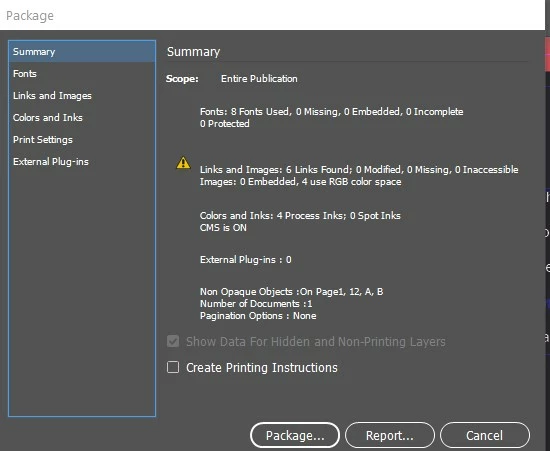
The package also failed.


Do package WITHOUT generating PDF - just fonts and links.


3 replies

akunceAuthor
Inspiring
November 16, 2022

I spoke too soon. It allowed me to Export to PDF once. Now it won't do it even if I create a new package.So I'm going scorched earth and untinstalling/reinstalling the dang thing, once our IT person with the admin password can do it for me.

(because I'm on a managed computer, it won't allow me to reset preferences to clar the cache either)

Community Expert
November 10, 2022

Would it be possible to share the file package to test it on our end? Or is it something confidential?


You can try resetting your preferences file to see if that does anything.

akunceAuthor
Inspiring
November 14, 2022

It's not confidential. It's just a program for an event.


Edit... it won't allow me to package the .indd.


Peter Spier
Community Expert
Community Expert
November 14, 2022

The .indd file alone is not sufficinet for testing. You need to package (File > Package...) the project to include the links and your fonts. If the packaging fails as well that will be another clue.

Peter Spier
Community Expert
Community Expert
November 10, 2022

Have yopu tried exporting to the desktop? Might be a permissions problem with the destination.

Robert at ID-Tasker
Legend
November 10, 2022

Yeah, like çćčĺł, etc. in the path or names of the linked/placed files?


@akunce 

So best would be to create Package and save it to c:\test\ then check all the names of fonts and links and then try to export to the same folder.

Or a different folder if you are on Mac 😉 


akunceAuthor
Inspiring
November 10, 2022

Ok, I will try that.

Fortunately it's not due for a few weeks.

Thank you.