
ianjmonk
Participant
August 3, 2018
Answered

Can't insert graphics from CC Libraries

  • August 3, 2018
  • 8 replies
  • 6382 views

I am trying to place graphics from my CC Library into an InDesign document, but I keep getting the error:

This file is already open by another user or application. This file may be stored on a network server and cannot be opened until the other user closes it.

I'm not able to pull from library in Illustrator of Photoshop either. I Photoshop I see the error "Could no place the document because the file could not be found. In Illustrator nothing happens at all. It doesn't work, but I don't see an error message either.

I tried following a couple of recommendations from users on this forum, but nothing has worked:

  • Closed and restarted all Adobe apps
  • Restarted computer
  • Renamed library
  • Duplicate graphics

The original artwork was on my desktop before I added it to my CC library. I haven't moved it, so even it was linking to the original it should be working.

As a test, I opened up a new EPS graphic and added it to my CC library.I was able to use that with no problems, so the issue seems to be with only with graphics I previously added to my library.

Any thoughts?

Thanks,

Ian
This topic has been closed for replies.
Correct answer AnneMarie Concepcion

I'm wondering if something got messed up in your CC storage hosted by Adobe. That's where CC library items live, they're not  on your hard drive, really  (so very strange  to get those messages).

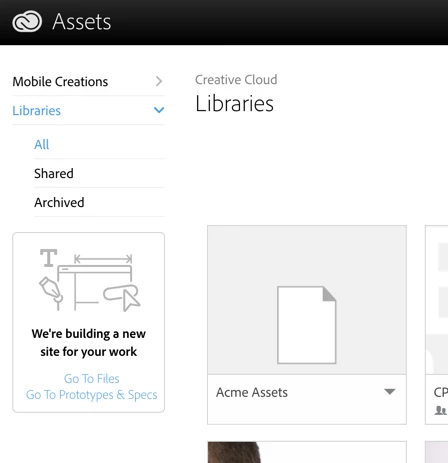
Can you see your library items on your CC space? Make a library active in CC Libraries in any app and choose View on Web from the panel menu, or go directly there: Adobe Creative Cloud

(That's assets2.adobe.com). Make sure you're logged in with your correct CC subscription email/pw.

That will help  in diagnosing the problem. I know Adobe has  been doing a lot of behind-the-scenes work with CC Libraries and CC Files, you may have been caught in a temporary glitch.

AM

8 replies

Mariia Novikova
Adobe Employee
Adobe Employee
September 26, 2020

Hi everyone,

We have identified the problem and looking into the ways to fix it for customers using Id 14. There is no issues with Libraries in the latest InDesign v15.
Unfortunately, there is no possibility this will be fixed on lower Id versions as those are not supported anymore.

We will keep you posted!

Thank you,
Mariia

Mariia Novikova
Adobe Employee
Adobe Employee
September 30, 2020

Hi again,

Hi @BertNing 

Our team has worked on a fix and we have it ready! While we are preparing to deliver this to everyone, we decided to post the CCLibraries installer to unblock customers who are facing this problem:
https://helpx.adobe.com/creative-cloud/kb/libraries-panel-not-working.html
Please, use the Libraries installer provided in Solution 1.

Let us know if that resolved the issue for you.

Thank you,
Mariia

Participating Frequently
October 1, 2020

Hi Mariia,

Sorry, only just got back to my computer, been freelancing off-site.

It worked! Thanks 😀

Bert

Participant
May 10, 2020

I have the same issue as originally described.  When I log in to my adobe I find that all of my library items are there.  Not sure why this still shows up.  I cant use the libary at all for files.  Onlypulls color swatchs.  Curently on macbook pro mojave

Ashutosh_Mishra
Inspiring
May 14, 2020

Hi there,


Sorry to hear about your experience. Would you mind sharing version of InDesign? Have you tried on a different machine if libraries work?

Please make sure you have the Creative Cloud desktop app and InDesign updated to the latest version.

You may try deleting the CoreSync & database files by following steps given below:

  • Quit the Creative Cloud desktop app.

       Go to:

  • Mac: <Mac Hard Drive>/Users/<username>/Library/Application Support/Adobe/CoreSyncSync
  • Windows: C:\Users\<username>\AppData\Roaming\CoreSync
  • And delete any file that has *.db (or a variation such as *.db-wal)
  • Restart the Creative Cloud desktop app.


Let us know how it goes. Looking forward to your response.


Regards,

Ashutosh


Likes

 
Participant
May 14, 2020

Hello,

I already quit CC and signed in again, but that didn't fix the issue. I
have already had the latest CC and ID version. Currently: 15.0.2

That file pathway doesnt exist on my macbook. I am on Mojave, macbook pro
2019


--
jansen erichson
{Personal information removed by MOD}

*"Tis not the loudest machines or inventions that move this world, truly it
is quiet thoughts and ideas in the mind, it is silence, verily this world
revolves- inaudibly." * -Nietzsche/Zarathustra

Participant
April 2, 2019

I have the exact same problem!!!!

Did you find any solution????

Steve Werner
Community Expert
Community Expert
April 2, 2019

Follow my advice and post CC Library questions here:

File Hosting, Syncing, and Collaboration

kasanda
Participant
December 3, 2018

I can't use anything from the library and on other spreadsheets that i created with the icon from the library are all blank. Can some someone help please, my deadline is around the corner.Can't insert graphics from CC Libraries

Steve Werner
Community Expert
Community Expert
December 3, 2018

I'd suggest posting your question on the forum below which is viewed by those who actually engineer the CC Libraries and CC assets

File Hosting, Syncing, and Collaboration

We use the libraries and assets in InDesign, but that's where they're developed.

AnneMarie Concepcion
Community Expert
AnneMarie ConcepcionCommunity ExpertCorrect answer
Community Expert
August 31, 2018

I'm wondering if something got messed up in your CC storage hosted by Adobe. That's where CC library items live, they're not  on your hard drive, really  (so very strange  to get those messages).

Can you see your library items on your CC space? Make a library active in CC Libraries in any app and choose View on Web from the panel menu, or go directly there: Adobe Creative Cloud

(That's assets2.adobe.com). Make sure you're logged in with your correct CC subscription email/pw.

That will help  in diagnosing the problem. I know Adobe has  been doing a lot of behind-the-scenes work with CC Libraries and CC Files, you may have been caught in a temporary glitch.

AM

Geоrge
Legend
August 31, 2018

Do a trick:

- Do another Adobe ID for yourself

- Share your CC library for this new Adobe ID

- Drag&Drop, create new CC library from dropped objects.

A question: Do you really need cloud library? If not than use classical "not cloud" .indl

Remember, never say you can't do something in InDesign, it's always just a question of finding the right workaround to get the job done. © David Blatner
hammer0909
Community Expert
Community Expert
August 31, 2018

Have you tried relaunching the Creative Cloud processes?

  1. Quit any running Adobe Applications including the Creative Cloud desktop application.
  2. Relaunch Creative Cloud desktop and press cmd+option+R (Mac) or ctrl+alt+R (Windows) to restart the CC processes.
  3. Relaunch InDesign and try using the libraries.
Kanikas
Community Manager
Community Manager
August 3, 2018

Moving to InDesign