



Mr. Met
Inspiring
April 8, 2022
Question

Can't put arrows on end of stroke.

  • April 8, 2022
  • 3 replies
  • 439 views

Can add an arrow or any other end stroke item. Running Apple Big Sur 11.6 and ID 17.2. I quit InDesign couple times. Haven't rebooted the Mac yet. Anyone else having an issue before I put a bug note in? Thx.
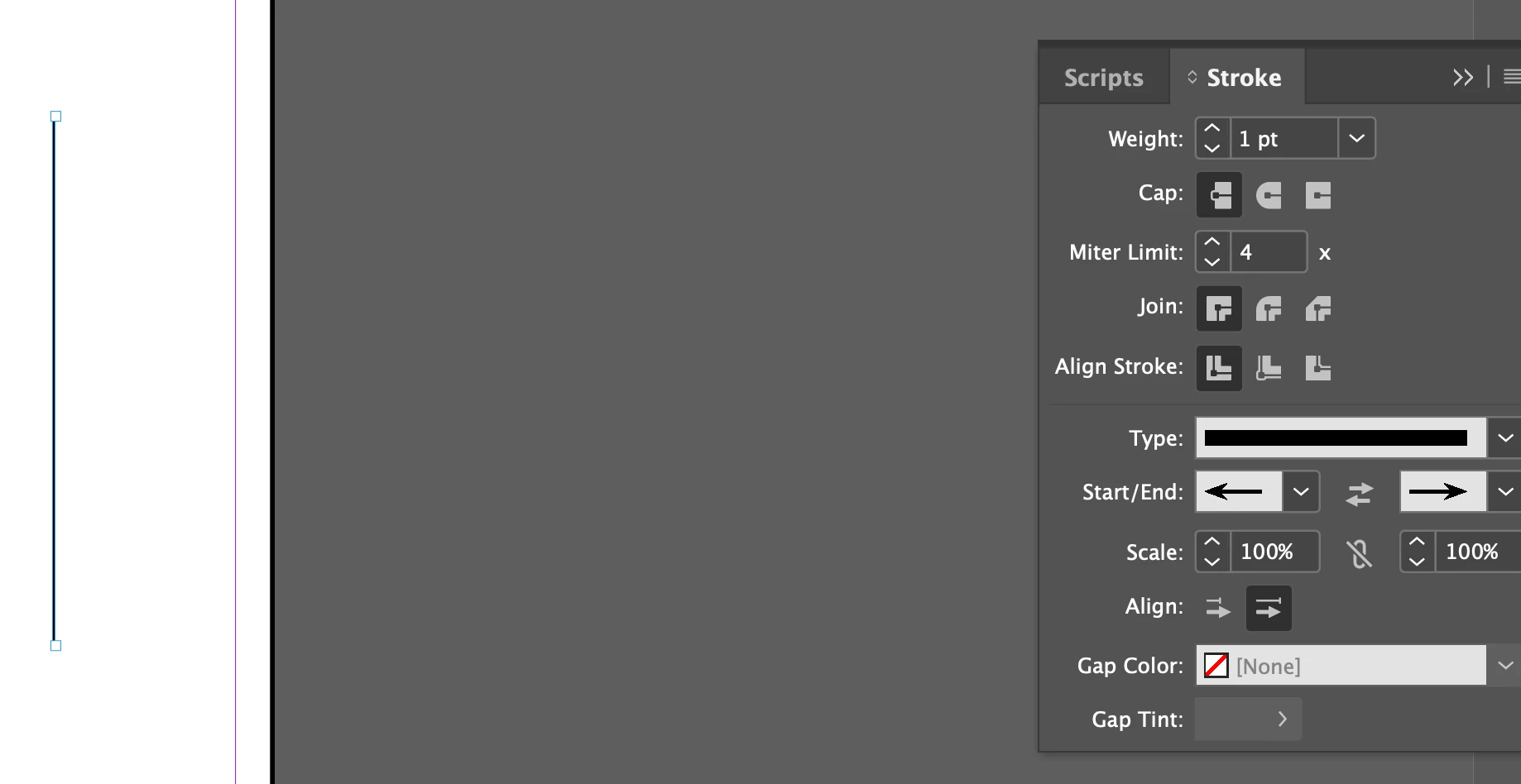
 

This topic is closed to new replies. Start a new post to keep the conversation going.

3 replies

Community Expert
April 9, 2022

Before you put a bug note in ...


Try rebooting perhaps?


--

If a document is not behaving well then try 

File>Export 

Choose IDML

Open the IDML in InDesign
Save the file as a new InDesign file with a new name
See if the issue persists


.

---

Try resetting your preferences:
The easiest way to reset everything is to delete the InDesign preferences: as soon as InDesign starts to boot hold down Shift, Alt, Ctrl (and Apple/Cmd if working on a Macintosh). A dialog will appear asking to delete the InDesign Preferences, select 'Yes' on this dialog.
Further info and instructions here if needed:
https://helpx.adobe.com/in/indesign/kb/indesign-preferences-support-file-locations.html


---

Reinstalling rarely fixes everything - you can do a complete reinstall using the
Creative Cloud Cleaner Tool https://helpx.adobe.com/creative-cloud/kb/cc-cleaner-tool-installation-problems.html


---

Rollback to a previous InDeisgn version

https://helpx.adobe.com/download-install/using/install-previous-version.html#:~:text=Open%20the%20Creative%20Cloud%20desktop,down%20list%2C%20select%20Other%20Versions.


----


Report bugs or make a feature request

https://www.adobe.com/products/wishform.html


Mr. Met
Mr. MetAuthor
Inspiring
April 9, 2022

Thanks for your help. Ending up resetting prefs. One last question. When I close an InDesign file I'm left with a black Indesign screen. I want to see the desktop when I close a file. How do I do that?

BobLevine
Community Expert
Community Expert
April 9, 2022

Assuming you're on a Mac, you'd have to turn off the application frame under the Window menu.