selvam214
Inspiring
December 5, 2014
Answered

Can't ungroup

  • December 5, 2014
  • 1 reply
  • 612 views

Hi,

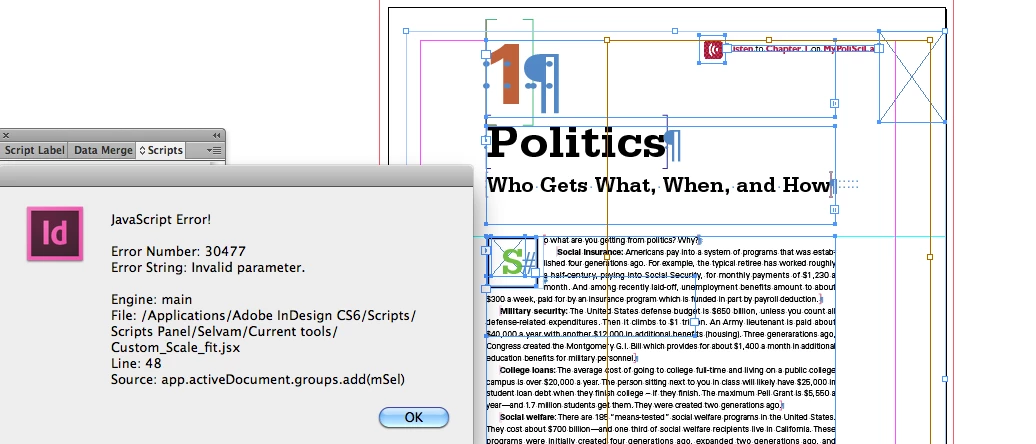
I trying to ungroup the page items, the error displayed as per below, some hidden frames also displayed.

What is this (Brown frame), and guide to me.

Code here:

var myPages = app.activeDocument.pages;

for(i=0; i<myPages.length; i++)

{

   var mySelection = app.select(app.activeDocument.pages.item(i).allPageItems)

   var mSel = app.selection;

app.activeDocument.groups.add(mSel)

    }

This topic has been closed for replies.
Correct answer Laubender

@selvam214 – when looking at your screenshot you are selecting objects that cannot be part of one group.

You cannot group anchored pageItems, nested graphics and "regular" pageItems to one group. And allPageItems will give you too much objects.

Another thing would be: You should add the group to a specific page.

Not just add the group to the document.

And you will have issues with locked page items…

//Locked pageItems could prevent items from beeing grouped.

//So we have to unlock all pageItems:

app.activeDocument.pageItems.everyItem().locked = false;

var myPages = app.activeDocument.pages;

for(i=0; i<myPages.length; i++){

    //If there are no pageItems on a page, you cannot add a group.

    //If there is only one pageItem on a page, you cannot add a group.

    if(myPages.pageItems.everyItem().getElements().length > 1){

        myPages.groups.add(myPages.pageItems.everyItem().getElements());

        };

};

Uwe

1 reply

selvam214
selvam214Author
Inspiring
December 5, 2014

Sorry,

I trying to group all page items.

LaubenderCommunity ExpertCorrect answer
Community Expert
December 5, 2014

@selvam214 – when looking at your screenshot you are selecting objects that cannot be part of one group.

You cannot group anchored pageItems, nested graphics and "regular" pageItems to one group. And allPageItems will give you too much objects.

Another thing would be: You should add the group to a specific page.

Not just add the group to the document.

And you will have issues with locked page items…

//Locked pageItems could prevent items from beeing grouped.

//So we have to unlock all pageItems:

app.activeDocument.pageItems.everyItem().locked = false;

var myPages = app.activeDocument.pages;

for(i=0; i<myPages.length; i++){

    //If there are no pageItems on a page, you cannot add a group.

    //If there is only one pageItem on a page, you cannot add a group.

    if(myPages.pageItems.everyItem().getElements().length > 1){

        myPages.groups.add(myPages.pageItems.everyItem().getElements());

        };

};

Uwe

selvam214
selvam214Author
Inspiring
December 8, 2014

Hi Uwe,

Thank you so much for this.

Selvam