Participating Frequently
May 5, 2017
Answered

Can't vertically align text in a cell using toolbar (MENA)

  • May 5, 2017
  • 3 replies
  • 784 views

It seems I can no longer use the buttons in the tool bar to vertically align the text in a table cell. Nothing happens when I click on them.
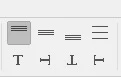
I can however vertically align the text by going the long way around, by pulling up the cell dialog box every time I need to do this, but it is becoming annoying. What can I do to make these buttons in my tool bar work?

(Title edited by moderator to include "MENA" to help future searches)
This topic has been closed for replies.
Correct answer jane-e

Yes, very weird. If it's an MENA issue, using the Table panel should help tremendously.

Be sure to report it as an MENA bug, though!

3 replies

jane-e
Community Expert
Community Expert
May 5, 2017

sandmanc  wrote

It seems I can no longer use the buttons in the tool bar to vertically align the text in a table cell. Nothing happens when I click on them.

How about the Table panel? Does that work?

sandmancAuthor
Participating Frequently
May 6, 2017

It does! Weird that they just dont work in the tool bar

jane-e
Community Expert
jane-eCommunity ExpertCorrect answer
Community Expert
May 6, 2017

Yes, very weird. If it's an MENA issue, using the Table panel should help tremendously.

Be sure to report it as an MENA bug, though!

sandmancAuthor
Participating Frequently
May 5, 2017

To further clarify, my coworker and I just downloaded the MENA version of InDesign and she is having the same issue. Could it be a problem with this version?

Community Expert
May 5, 2017

Well, yes…

I cannot see this behavior with my German InDesign CC 2017.1.

Regards,
Uwe

Community Expert
May 5, 2017

Hi,

I have no idea what the exact cause of the problem might be.

My suggestion:
Upload a single page document with a table where you see this to a download service like Dropbox.
Post the link to the document so that someone can see into this.

Thanks,
uwe