



dublove
Legend
July 26, 2024
Question

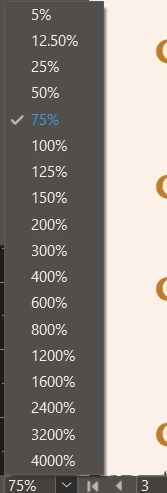
Can these values ​​be customized, where can I set it?

  • July 26, 2024
  • 6 replies
  • 460 views

Can these values ​​be customized, where can I set it?
I remember when I asked a similar question last time, I could jump directly from 100% to 80%. After the new version of 19.5, I can only jump to 75%.

I need 80% or 85%
This topic has been closed for replies.

6 replies

Barb Binder
Community Expert
Community Expert
July 28, 2024

Do you need to hold all of the modifier keys, @dublove? Doesn't it work by just pressing Alt while using the mouse scroll wheel?


Here is a link to the various magification techniques: https://helpx.adobe.com/indesign/using/viewing-workspace.html


~Barb


~Barb at Rocky Mountain Training
Barb Binder
Community Expert
Community Expert
July 27, 2024

Hi @dublove :


I have InDesign 17.4.2, 18.5.3, 19.4 (and just updated to 19.5 to test) and the Beta installed. All list 50%, 75% and 100%. None offer 80% in the list, nor can we customize the list. As per John and Bill, typing a value works in all versions but if you want to use a key command, I'd say Robert's answer is your best bet. 


~Barb

~Barb at Rocky Mountain Training
dublove
dubloveAuthor
Legend
July 28, 2024

I found that pressing Ctrl+Alt+Shift at the same time, and then pressing the wheel is another amplification

It is also a good choice if the focus area of ​​the mouse can be enlarged at the same time.

There is a certain rule with mouse dragging and dragging


Robert at ID-Tasker
Legend
July 26, 2024

@dublove


You can create a script - set any value you want or increase / decrease - and assign a shortcut to it. 


Bill Silbert
Community Expert
Community Expert
July 26, 2024

Double-click on the 75% in the bottom left of your screenshot and then type whatever value you want and then click the enter key. It's live text.

dublove
dubloveAuthor
Legend
July 27, 2024

But you still cannot set the shortcut key for 85%

John D Herzog
Inspiring
July 26, 2024

You can always just type it in the field instead of hitting the arrow.

leo.r
Community Expert
Community Expert
July 26, 2024
quote

I remember when I asked a similar question last time, I could jump directly from 100% to 80%. After the new version of 19.5, I can only jump to 75%.

By @dublove


It's the same in 19.4. So if there was a change then it didn't happen in 19.5.