Inspiring
October 14, 2019
Answered

Can this be done in InDesign?

  • October 14, 2019
  • 1 reply
  • 479 views

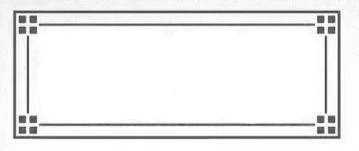
I've been looking all over the Internet for a frame like the one in the photo. I'm looking in Shutterstock and Adobe Stock, but nothing has come up. It seems to me it should be fairly simple to make one myself. Can it be done in InDesign? If so, can anyone tell me the easiest way to do this?


Thank you very much!
    This topic has been closed for replies.
    Correct answer John Mensinger

    Yes, for a one-off application, that can easily be assembled using native-drawn InDesign shapes and paths. If you want to be able to apply it to rectangles of any size and proportion, the correct tool would be an Illustrator Pattern Brush.

    https://helpx.adobe.com/illustrator/how-to/illustrator-create-pattern-brush.html


    1 reply

    John Mensinger
    Community Expert
    John MensingerCommunity ExpertCorrect answer
    Community Expert
    October 14, 2019

    Yes, for a one-off application, that can easily be assembled using native-drawn InDesign shapes and paths. If you want to be able to apply it to rectangles of any size and proportion, the correct tool would be an Illustrator Pattern Brush.

    https://helpx.adobe.com/illustrator/how-to/illustrator-create-pattern-brush.html


    Inspiring
    October 14, 2019
    Thank you. I'll have to watch the video, as I hardly know how to do anything in Illustrator!