
kisuke29
Participant
January 25, 2022
Answered

Can you add stroke to underline?

  • January 25, 2022
  • 4 replies
  • 510 views

Is there an option to add a stroke to an underlined word or text.
example:

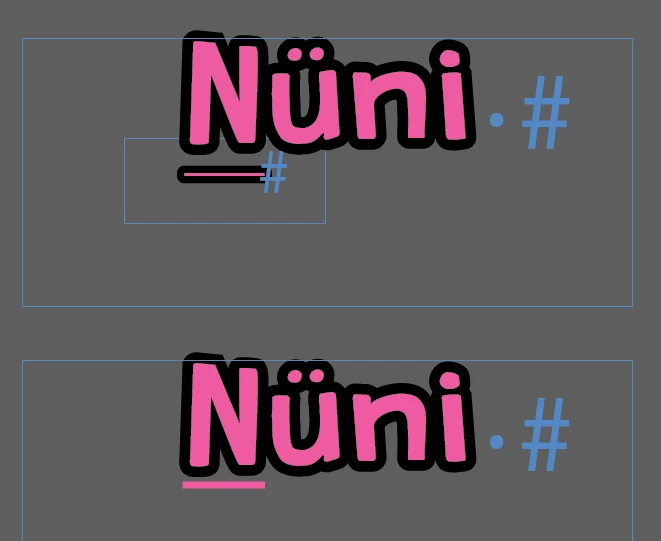
Nüni = the 'N' is underlined. After highlighting the text to add a stroke effect, it is only applied on the text.

Is there a way/option to add the stroke effect also on the underline? For now I only replaced the underline with a underscore in a separate text frame then added the same stroke effect and placed it below the 'N'.

Thanks 🙂

See screenshot below. 
 

This topic has been closed for replies.
Correct answer Steve Werner

I'm pretty sure it's not possible without using the workaround you're using.

The stroke only applies to the glyphs (characters) in the font. The underline is a separate attribute being applied, in this case, to a single character, and there is no way to define a stroke for an underline, or a strikethrough or similar attributes.


4 replies

Peter Spier
Community Expert
Community Expert
January 25, 2022

I've done something similar to the original workaround, but it doesn't need two frames. I typed the underscare first, then the N. Added negative kerning (in this case -520) and scaled the underscore horizontally (130%) to get the width. Probably just as fiddly as the paragraph rule.

kisuke29
kisuke29Author
Participant
February 2, 2022

Nice workaround using kerning! Appreciate the idea.

Thank you all! 😉

Legend
January 25, 2022

I was able to do this on live text using Paragraph Rules. It took a bit of finessing the numbers, and using a Japanese Dots style rule with the same color on rule and gap to make the edges rounded. 


Steve Werner
Community Expert
Community Expert
January 25, 2022

Nice workaround!

Dave Creamer of IDEAS
Community Expert
Community Expert
January 25, 2022

The only way I was able to get the effect was to set the type in Illustrator and convert to outlines. 

Converting to outlines in ID removed the underline. 

Note: I did not try to match the font. 

David Creamer: Community Expert (ACI and ACE 1995-2023)
Steve Werner
Community Expert
Steve WernerCommunity ExpertCorrect answer
Community Expert
January 25, 2022

I'm pretty sure it's not possible without using the workaround you're using.

The stroke only applies to the glyphs (characters) in the font. The underline is a separate attribute being applied, in this case, to a single character, and there is no way to define a stroke for an underline, or a strikethrough or similar attributes.


Bevi Chagnon - PubCom.com
Legend
January 25, 2022

Although InDesign does let us control the size, position, and style of an underline, stroke isn't one of the options.

In a paragraph or character style, see the Underline Options in the style's definition dialogue (towards the bottom left).


|    Bevi Chagnon   |  Designer, Trainer, & Technologist for Accessible Documents ||    PubCom |    Classes & Books for Accessible InDesign, PDFs & MS Office |