Known Participant
March 30, 2021
Answered

Can you import Illustrator Pantone Swatches into Indesign?

  • March 30, 2021
  • 4 replies
  • 1337 views

I created some Pantone swatches in Illustrator and am now making a document in Indesign with the same colors. How can I import the illustrator color swatches into indesign? Whenever I just copy and paste shapes filled with color it converts them to CMYK. I need to create a sharable swatch of palettes to distrube amongst a few people.


Thanks!
This topic has been closed for replies.
Correct answer jmlevy

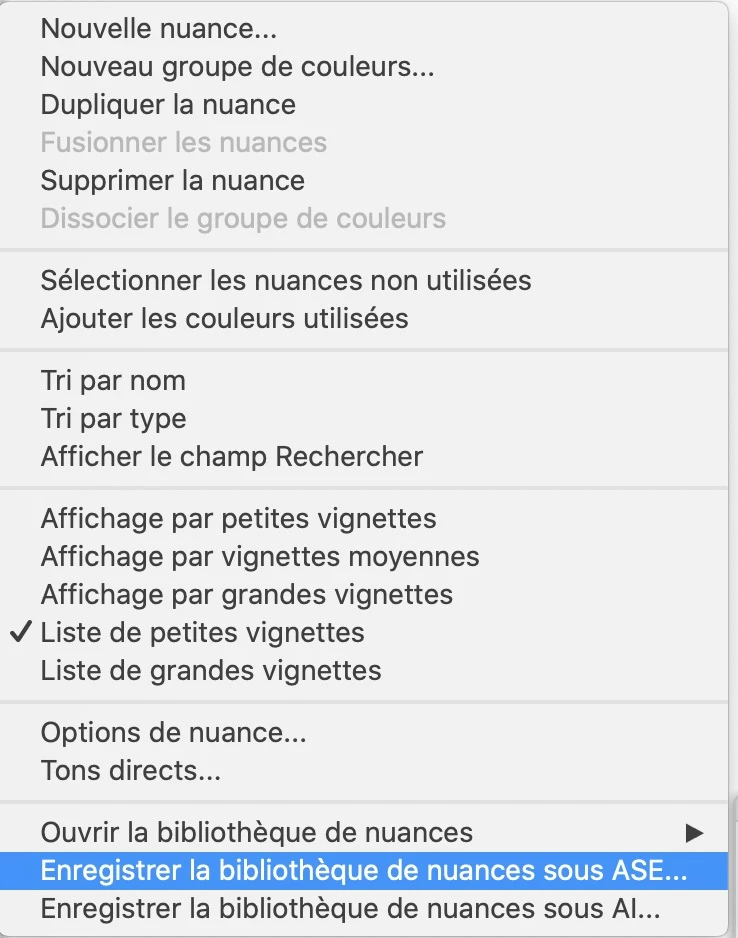
In Illustrator, save the swatches as ase format:

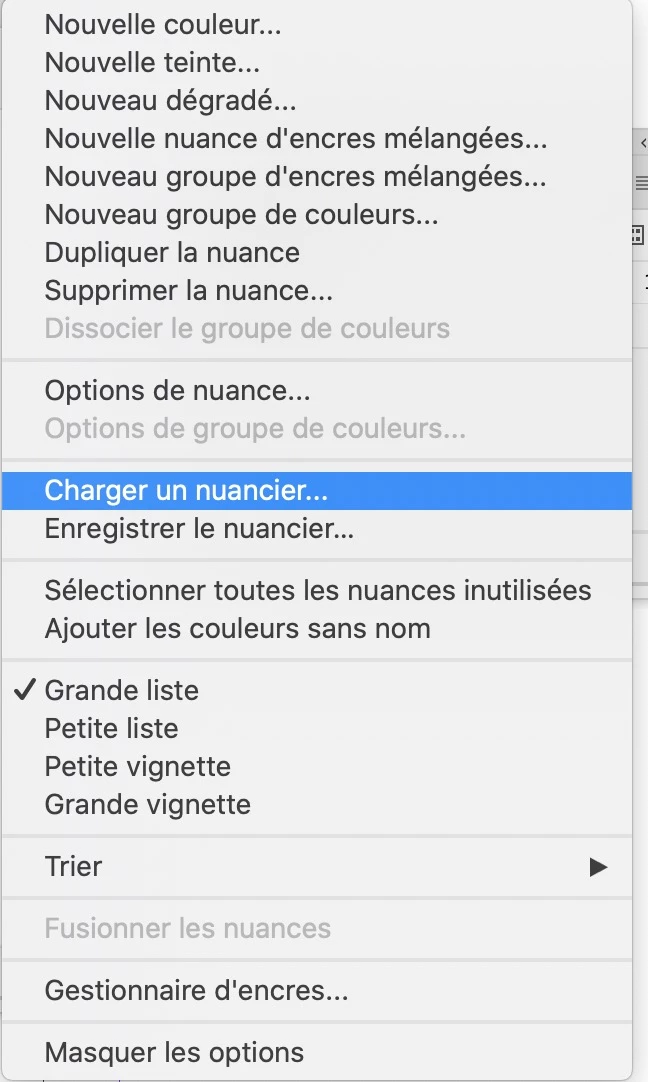
In InDesign, load the swatches

4 replies

Dave Creamer of IDEAS
Community Expert
Community Expert
April 1, 2021

BTW, the ASE files only support flat colors. (I'm using "flat" as not to confuse it with "solid".)


You can get AI gradients into ID by filling some shapes (like rectangles) with the gradients in AI. Copy and paste into ID. The gradents will show up in the Swatches panel (sans their nice AI names). Gradients with transparency don't transfer, and of course, patterns are not supported. 

David Creamer: Community Expert (ACI and ACE 1995-2023)
Community Expert
March 31, 2021

Hi olive_and_finch,

I'm curious why you had to create some PANTONE swatches in Illustrator.

Illustrator is able to load InDesign's PANTONE Swatch Libraries *.acb files.

InDesign's *acb files can be found in Presets > Swatch Libraries of the InDesign Application folder.


From my German Windows 10 system:


PANTONE+ Solid Coated.acb loaded in Illustrator:


And added to the Swatches panel in Illustrator:


Regards,
Uwe Laubender

( ACP )

JonathanArias
Legend
March 30, 2021

if you want those swatches available in all of your adobe apps, consider using a CC library .

Community Expert
March 31, 2021

Hi Jonathan,

I don't think that exchanging PANTONE spot color swatches between Illustrator and InDesign or InDesign and Illustrator with CC Libraries is a good idea. You will lose some valid properties. The lab values. At least some of my tests are showing this.


Regards,
Uwe Laubender

( ACP )

JonathanArias
Legend
March 31, 2021

I have not had issues.


I though that was the point of cc libraries, if there are issues that seems like a software issue. 

jmlevy
Community Expert
jmlevyCommunity ExpertCorrect answer
Community Expert
March 30, 2021

In Illustrator, save the swatches as ase format:

In InDesign, load the swatches