I'm assuming that you're already storing all your InDesign documents on an external drive already. If you're not, I'd start there before doing anything more to see if moving your document files can give you the headroom you're looking for.
Understand that this is not official Adobe support. This is just some yahoo end user offering an opinion on how to do what you say you want to do. And even he's recommending against you doing it.
InDesign preferences allow you to specify exactly where your document recovery data (a high-falutin' way of saying your recovery files) are stored. You can see how to change that to a different place than its default location in the illustration below:.
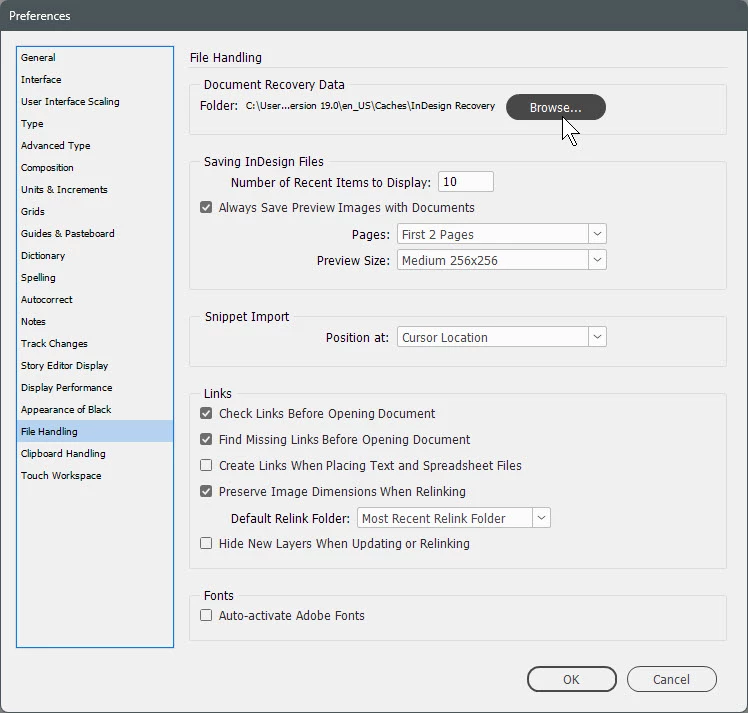
Please recognize, though, that you're digging fairly deep under the hood as you move this from your C: drive to a remote location. You want to be absolutely sure that your new location is always available to your system and it doesn't get disconnected and renamed with a different drive letter when reconnected. You're defining an absolute location for your system to store, retrieve and access these critical files. Messing with that absolute location, whether it's done by you or your system independently, is perilous.
If you really want to do this, you may want to carefully read and understand what you're doing by reading this Adobe Help page. While it addresses recovery of problematic documents, the Change the location of recovered documents section outlines how to change where those documents are stored.
If it was me, I wouldn't do this. I'd just buy a larger capacity SSD of the appropriate form factor and use a cloning utility like Clonezilla to move all your current C: drive data to that new, larger drive, then install the new drive into your system and dispense with messing around under the hood of InDesign. It's a much safer way to go.
Hope this helps, and I hope you take the safer alternative path immediately above instead of messing with InDesign to get you past your issues. It's really the better way to go.
Randy




 AdChoices