
Participating Frequently
February 17, 2025
Question

Cannot export pdf

  • February 17, 2025
  • 2 replies
  • 2038 views

Hi,

I have a 300 page doc with hundreds of pictures. When I try exporting to PDF, i encounter 2 issues:

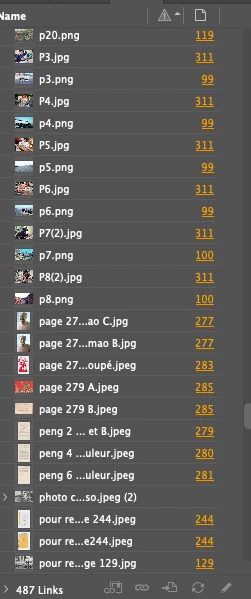
1. "This doc contains links to files that are not accessible" error message. However, i relinked all images. Images in orange means it's good to go yes ?
 

2. "Failed to Export the PDF file.Possible cause of failure is present on spread with page number "22". Usually, when replacing the images by drag and dropping images from files to indd, it works and the next spread with error is a higher page number (eg.: next error is on page 23). Sometimes, it's a lower number (like 4). 


Wondering if anyone can help me with this...


THanks 

2 replies

Willi Adelberger
Community Expert
Community Expert
February 17, 2025

What file types did you use except jpg and png?

What do you see on p22?

Is it for print? If so, why do you use so many png?

Are the images linked or embedded? If they are linked, are they on a storage in the cloud, like dropbox?

Participating Frequently
February 17, 2025

Hello Willi,

What file types did you use except jpg and png? I believe only jpg and png

What do you see on p22? 5 pictures. When i drag and drop (or relink) the pics, it works. i.e. the error is now on page 12. When i replace pics on page 12, the error will be on another page. Sometimes, the error is on page 22 again.

Is it for print? If so, why do you use so many png? yes. I work with the pictures i am given. For context, i am not good with all this. This is my first project using indesign. Exports were working fine until i finished the project. I then moved all files to cloud (and deleted the files on my computer), not knowing it would affect the project. I then re-downloaded all pics to their original place, and re-linked all pictures missing a link.

Are the images linked or embedded? If they are linked, are they on a storage in the cloud, like dropbox? Both. Some are linked (i used the "link image" button), some are copy pasted from word, etc. It's a mess I know.


... i am starting to think the easiest way to fix this is to start everything again, all 314 pages 😞

Community Expert
February 17, 2025
quote

Hello Willi,

What file types did you use except jpg and png? I believe only jpg and png

What do you see on p22? 5 pictures. When i drag and drop (or relink) the pics, it works. i.e. the error is now on page 12. When i replace pics on page 12, the error will be on another page. Sometimes, the error is on page 22 again.

Is it for print? If so, why do you use so many png? yes. I work with the pictures i am given. For context, i am not good with all this. This is my first project using indesign. Exports were working fine until i finished the project. I then moved all files to cloud (and deleted the files on my computer), not knowing it would affect the project. I then re-downloaded all pics to their original place, and re-linked all pictures missing a link.

Are the images linked or embedded? If they are linked, are they on a storage in the cloud, like dropbox? Both. Some are linked (i used the "link image" button), some are copy pasted from word, etc. It's a mess I know.


... i am starting to think the easiest way to fix this is to start everything again, all 314 pages 😞


By @Renata1982


Some advocate that PNG is a web only graphic (and it is don't get me wrong it's use is for the web), but in truth I use them all the time in print and frankly don't have any issues with it, the CMKY conversion is fine for me and never had an issue - if you're images are colour critical it might be best to use another format where you can control the CMYK output - but for non critical colour work PNG works fine for me and has for as long as I can remember. That being said, if I had to edit the image, I'd save as tiff or PSD - but for placing into InDesign, I do the same, just place what is given to me, unless it's causing an issue.


The error moving, this doesn't indicate which page it's crashing on, sometimes it can get right to the last page of export and the error is on the first page - it's not an indication of where the error lies - I've found this to be true. 


I see you've been moving pictures around - try using File>Package and this creates a folder with all your assets in a single place, with a new inDesign file. Try exporting this - package it to a folder on your computer (not the Desktop).


You could try embedding all the images - it might take away the issue of the images being linked to cloud cyncing services - you could try it - then unembed the links if it works.


Personally, I embed links in InDesign files, others ay not to, but for the last 5 years I've not had a single issue with it. And I do it everyday - but I guess everythign comes with caveats. 


I don't think you need to start again - I think we can track down the issue and fix it and if you need further help I'm certainly available by DM if you wish to share files with me and I'm happy to take a look.

Community Expert
February 17, 2025

First thing to try 


If a document is not behaving well then try 

File>Export 

Choose IDML

Open the IDML in InDesign
Save the file as a new InDesign file with a new name
See if the issue persists.


----------

If it's still happening

Try exporting half the amount of pages - then export the other half of pages

Whatever side it fails on is where the issue is. 

Keep dividing the page export range in half and testing each half 

So for 200 pages export page 1-100 then 101-200 

if it fails, try export 1-50 and 101-150 

and so on


You'll quickly get to the page(s) with issues.


It could be an dodgy image, graphic, text frame, table, or anything on the page(s). 


Let us know how you get on

Participating Frequently
February 17, 2025

Thank you Eugen Tyson for your suggestions. 


I tried your first solution but it didn't work. The new file is missing more than half the pictures (see below). I will give solution #2 a try


Community Expert
February 17, 2025

Are you sure you're showing the images? Can you go to View>Display Performance and choose High Quality?


If after exporting IDML and the images are truly missing then it's likely corruption somewhere in the file. 


Hopefully exporting the page ranges will track down the page(s) for you.