
Participant
November 19, 2019
Answered

Cannot remove random horizontal line in InDesign

  • November 19, 2019
  • 3 replies
  • 2812 views

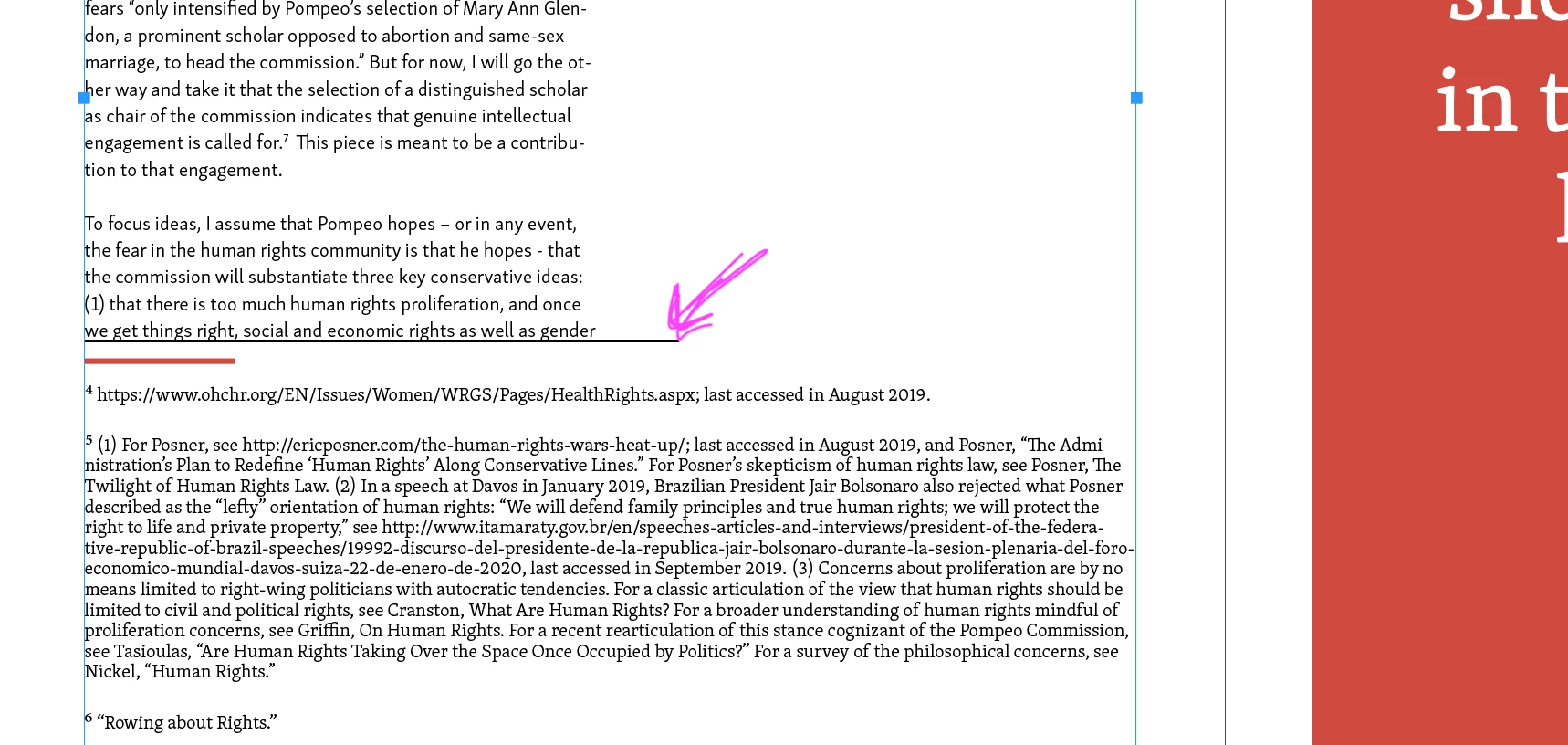
For whatever reason, a random black horizontal line has appeared in my ID document, and I can't seem to remove it. It's appearing at the bottom of the text of the left-most column of a two-column page, yet it seems to extend beyond the column divider. 

I've unchecked/ removed the horizontal line that appears in footnote style windows, and also unchecked any lines that might accompany columns (the little red line was made manually). Where is this black line coming from and how can I remove it?? Screengrab of black line included below:
Correct answer Digga Marketing

Late to the party but I resolved this by removing the paragraph style that was applied to it which was causing the issue for me! 😊 (Window > Styles > Paragraph Styles)

3 replies

Digga MarketingCorrect answer
Participant
January 7, 2025

Late to the party but I resolved this by removing the paragraph style that was applied to it which was causing the issue for me! 😊 (Window > Styles > Paragraph Styles)

TᴀW
Legend
November 20, 2019

Could be a paragraph rule, paragraph border, or continued-footnote line (you can set 2 types of lines for footnotes, did you check that both are off?)

Legend
November 19, 2019

Have you checked to see if this is a paragraph rule? (It could be set as Rule Above or Rule Below, so you would need to check both)