cannot type in "find format" find/change field
IND 2017.0 release on Mac running OSX El Captian 10.11.6
This just started happening today. I have rebuilt my IND prefs (using shift/ctrl/opt/cmd on restart of IND). Restarted computer, new file etc. and I still am not able to type in the field. It also won't show my fonts in the drop down. This image shows only recent fonts (before I rebuilt prefs) and not the whole list of loaded fonts. The full list does show when I access it from the type menu or control panel.
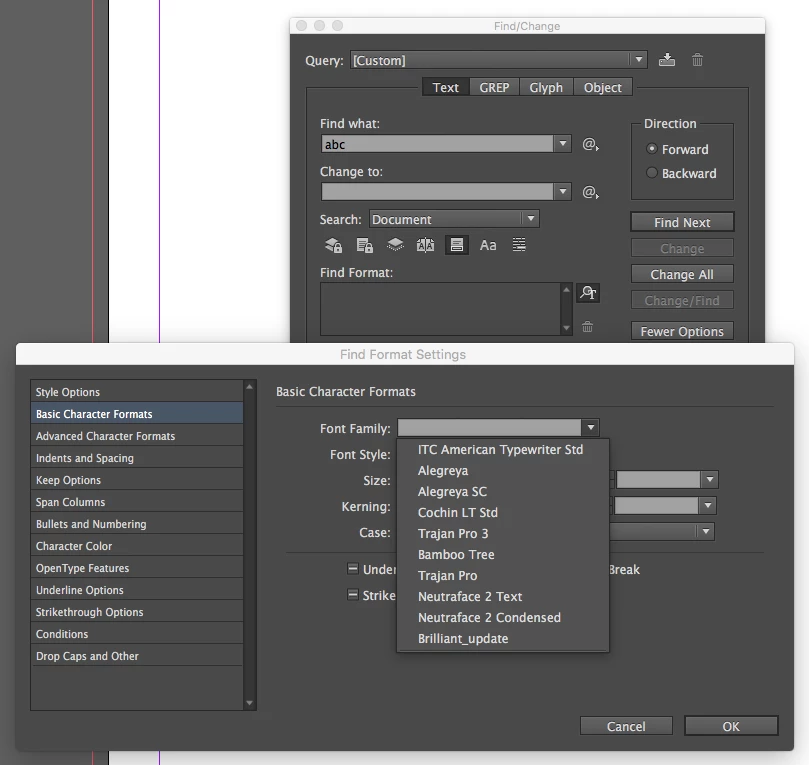
I have had issues before with the type fields in the find/change dialogues going wonky (sometimes typing backwards!) but this was usually fixed by rebuilding the prefs. I am not sure what to do now.
One thing has changed on my computer. Yesterday I updated Xquartz to version 2.7.1. I wanted to try FontForge to build an icon glyph as a font. I wasn't able to get that to work and generated no fonts, so no new fonts installed either. This required me to change one default preference in Xquartz (under which FontForge runs, I guess). That was to uncheck: INPUT: Enable Key equivalents under X11 (When enabled, menu bar key equivalents may interfere with X11 applications that use Meta modifier.)
I have since turned this check mark back on in the default setting. So, I don't know if this has anything to do with it. It did not make a difference with this problem after I turned it back on.
I have resisted updating to 2018 for several reasons, also not updating to High Sierra is intentional due to other software incompatibilities. My reason for not updating include production downtime due to problems. I usually wait to see what others are experiencing.
Any help appreciated. I think I can still IND but not being able to see my fonts in the fields or type will pinch productivity.
 AdChoices