
Lucky Rabbit Studio
Participating Frequently
December 16, 2019
Answered

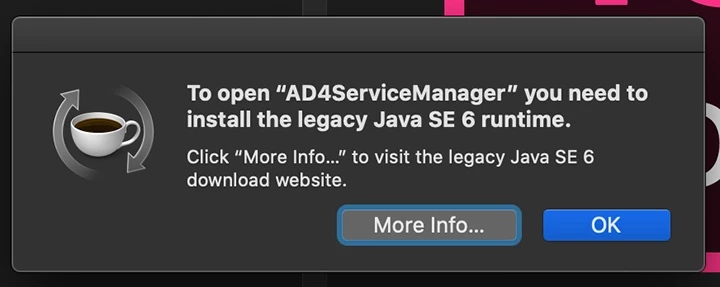
Catalina/InDesign 2020 AD4ServiceManager needed to install the legacy Java SE 6 runtime
  • December 16, 2019
  • 2 replies
  • 3034 views

Hello! Ever since loading Catalina (A big mistake—I usually wait 6 months but approved the new system w/o realizing what it was!) InDesign 2020 gives me the error then takes 3-4 minutes to load afterwards. With multiple projects all done in ID, that's a lot of minutes to wait ever day...


I've gone through and uninstalled Creative Cloud, and Adobe apps, ran Adobe's Creative Cloud Cleaner and used Clean My Mac to delete all older Adobe files, but I still get the error. I've uploaded old and new Java as well to no avail.


Any thoughts? Thanks!

This topic has been closed for replies.
Correct answer Test Screen Name

This appears to belong to Adobe Drive, something that was discontinued 2 years ago. It is also incompatible with Creative Cloud 2017 and later. While there is no chance of getting it working, if you have an IT department, I suggest you contact them about it, they may have special requirements. It is not installed for normal end users of Creative Cloud.

2 replies

KittyQuig
Known Participant
September 16, 2020

How are you guys getting this to work? I have Adobe Drive files, but they are older files on back-up drives and irrelevant becasue they aren't grouped with the new system software and applications. Strangely, my  mac won't even let me delete them. The Adobe Drive CS4 even has the crossed out logo over top of its icon. 


Test Screen NameCorrect answer
Legend
December 16, 2019

This appears to belong to Adobe Drive, something that was discontinued 2 years ago. It is also incompatible with Creative Cloud 2017 and later. While there is no chance of getting it working, if you have an IT department, I suggest you contact them about it, they may have special requirements. It is not installed for normal end users of Creative Cloud.

Lucky Rabbit Studio
Participating Frequently
December 16, 2019

Great! I went through my system and deleted all references to Adobe Drive and now InDesign is working like it should. Thanks for all your help and have a happy holiday!

Mark

Participant
December 31, 2019

how did you find the drive files to delete?