

Zen Creative Agency
Known Participant
September 24, 2024
Question

CC Libraries Pane Issues: Difficulty Dragging Items into the Bin Icon in InDesign

  • September 24, 2024
  • 1 reply
  • 443 views

This has been happening for about 6 months now.

In the CC Libraries pane, when I try to drag anything into the bin icon at the bottom, the whole inside area of the pane moves/shuffles around (like dragging the scroll bars on a web page that isn't responsive, for example). 


This results in me not being able to drag and drop anything into the bin, as the bin icon will always shuffle away from the mouse cursor.


It's bin annoying. 
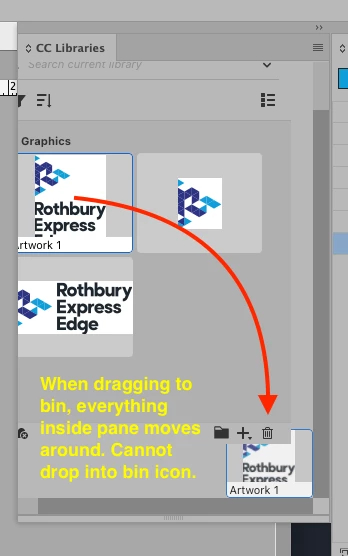


<Title renamed by MOD>


1 reply

leo.r
Community Expert
Community Expert
September 24, 2024

First, try to reset preferences and caches - it can resolve some unusual UI issues:

https://www.rockymountaintraining.com/adobe-indesign-rebuilding-preferences-cache/


If it doesn't help, then what are your versions of InDesign and the operating system?

leo.r
Community Expert
Community Expert
September 24, 2024

P.S. Actually, I can confirm the exact issue you're reporting (macOS 13.7, InDesign 19.5). However, do you know that you can just select the desired item and then just click the trash icon instead of dragging into it?

Zen Creative Agency
Known Participant
May 3, 2025

Yes, of course I know that - but the pane should be working properly and not shifting around stupidly. There have been 2 updates of InDesign since this problem, AND IT IS STILL NOT FIXED! COME ON ADOBE!