Community Expert
October 22, 2018
Question

CC2019 Content Aware Fit crashes everytime

  • October 22, 2018
  • 4 replies
  • 1912 views

Decided to show off CC2019 to some colleagues and the Content Aware Fit  is crashing all the time.

It's a newly created document.

Images are stored on server - thought this was the problem - moved all images to desktop - still crashes.

Saved the file to IDML and opened that and resaved it.

Reset the preferences

Shut down/End Task of all non-essential programms, including anti-virus.

Any ideas?
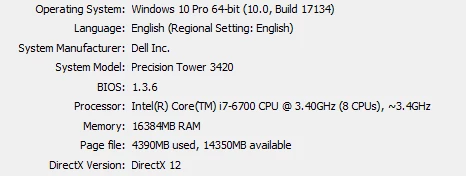
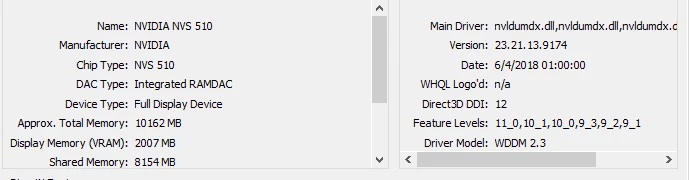
CC2019 build

    This topic has been closed for replies.

    4 replies

    Srishti_Bali
    Legend
    November 15, 2018

    Hi All,

    We have fixed this issue in our latest release InDesign CC2019.0.1. I would recommend you to upgrade to the latest version as it is more robust.

    Let me know if you still face this issue.

    Regards,

    Srishti

    Srishti_Bali
    Legend
    November 15, 2018

    Hi all,

    Sorry about the miscommunication, this patch update is on Prerelease at the moment. I believe it will officially available soon. Please find more details here: Adobe Prerelease

    Regards,

    Srishti

    Community Expert
    October 22, 2018

    It is probably just something on the computer, some file to dump and let it regenerate.

    I was using it last night on the laptop testing it out.

    Tried on the work PC today and it doesn't work at all.

    Community Expert
    October 22, 2018

    Sorry for the sideways video - but it shows what's happening

    Community Expert
    October 23, 2018

    Hi Eugene,

    my browser says "This video is not available".

    Regards,
    Uwe

    Community Expert
    October 22, 2018

    Hi Uwe

    Tried it without the preference option - and it crashes.

    WIth the preference option on - it crashes

    Images - jpg pixel based.

    I could try with tiff or eps etc.

    AnshulJain19
    Adobe Employee
    Adobe Employee
    October 22, 2018

    Hi Eugene,

    Is InDesign crashing when placing an image?

    Is it happening with few specific images or most of the images?

    Can you please share your problematic image to ansjain@adobe.com.

    Regards

    -Anshul

    Community Expert
    October 22, 2018

    Thanks - it happens on any image.

    File share on the way to you.

    Kind regards

    Eugene

    Community Expert
    October 22, 2018

    Hi Eugene,

    are you running Content Aware Fit enabled in preferences?

    Or are you testing the function with selected frames?

    What kind of images are placed?

    Only pixel based formats?

    Regards,
    Uwe

    Community Expert
    October 22, 2018

    Tried eps, psd, tiff etc all crash.

    Community Expert
    October 22, 2018

    Hm.

    To test that I'd need your document and the images.

    I'm also on Windows 10, but I see no crash with my tests with Content Aware Fit.

    Sometimes bad results, yes, but no crashes.

    Regards,
    Uwe