



JonathanArias
Legend
January 29, 2019
Answered

cell height as a set style

  • January 29, 2019
  • 13 replies
  • 5550 views

Hi, i have a table with 3 columns and one row. on cell has a number, next is copy, and next and icon.

as you can see below. I have situations in which the copy runs two lines.  how can i set the height of my table that starts with the number 18 to match my cell with the number 17, i have table styles and cell styles set up. i just don't know how do i set a cell height. Thanks
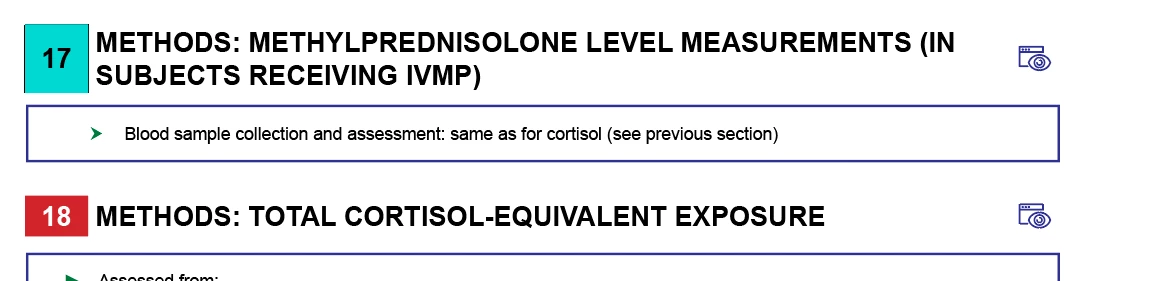

    Correct answer Barb Binder

    Cell width and height are not included as part of cell styles, Jonathan. You can define cell insets and could use the type size and top/bottom insets to control the height.

    ~Barb

    13 replies

    Brad @ Roaring Mouse
    Community Expert
    Community Expert
    September 16, 2024

    Define your number block cell style to include top and bottom offsets to force the box to the same height as the one with two line copy. That should work.

    NMX_00
    Participating Frequently
    September 17, 2024

    Messing with the top and bottom offsets did work. Thank you very much. 

    BobLevine
    Community Expert
    Community Expert
    January 29, 2019

    The only way I know of to add cell size to the styles is with this plugin: https://www.woodwing.com/en/smart-styles-adobe-indesign-plugin

    JonathanArias
    Legend
    January 29, 2019

    thanks Bob!!

    stay warm my friend.

    i might be in Philly again February or March. i will let you know maybe we get together. this time i pay ok?

    BobLevine
    Community Expert
    Community Expert
    January 29, 2019

    Let me know…I’ll be there.

    Community Expert
    January 29, 2019

    Hi Jonathan,

    to gain more control over styling, especially styling tables, look into Woodwing's Smart Styles plugin:

    Smart Styles - Adobe InDesign plugin | WoodWing Software

    Regards,
    Uwe

    JonathanArias
    Legend
    January 29, 2019

    thanks, yes, this would work but i have a zero dollars budget.

    Barb Binder
    Community Expert
    Barb BinderCommunity ExpertCorrect answer
    Community Expert
    January 29, 2019

    Cell width and height are not included as part of cell styles, Jonathan. You can define cell insets and could use the type size and top/bottom insets to control the height.

    ~Barb

    ~Barb at Rocky Mountain Training
    JonathanArias
    Legend
    January 29, 2019

    yes, this will do.

    one cell height to rule them all.. very lord of the rings.