Hi there!
I'm not an expert in CEP development (I just played a little with it), but I would try the following:
Find the location of your CEP extensions. For example, on my Windows computer, it's here:
C:\Program Files (x86)\Common Files\Adobe\CEP\extensions

Then go to the extension folder that you want to fix. I recommend backing up the whole folder just in case.
Look for the manifest.xml in the CSXS folder.
Open it in a plain text editor.
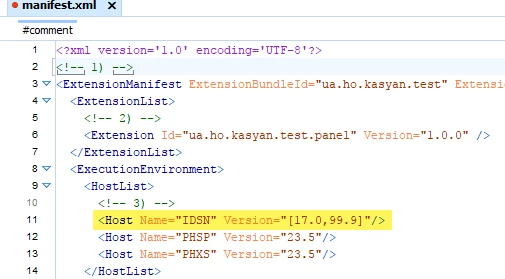
Note the HostList which lists apps and their versions supported by the CEP extentions.
Note the line marked in yellow in the screenshot above:
IDSN means InDesign.
I guess in your file, the version is set to the current InDesign version when it was developed, e.g.:
Version="18.0"
so it's limited to 2023
Try to change it to the array, like in the screenshot. It means from version 17.0 to 99.9.
In other words, don't limit any new app versions (I don't expect version 99.9 in the near future).
Hope it helps!
— Kasyan

 AdChoices