
Participant
June 11, 2017
Answered

CEPHtmlEngine.exe Application Error - How To Fix?

  • June 11, 2017
  • 1 reply
  • 15824 views

Hi,

I recently installed InDesign CC on Windows 10. On opening InDesign (for the second time, it worked the first time), I encounter the following error message and the application 'jitters':
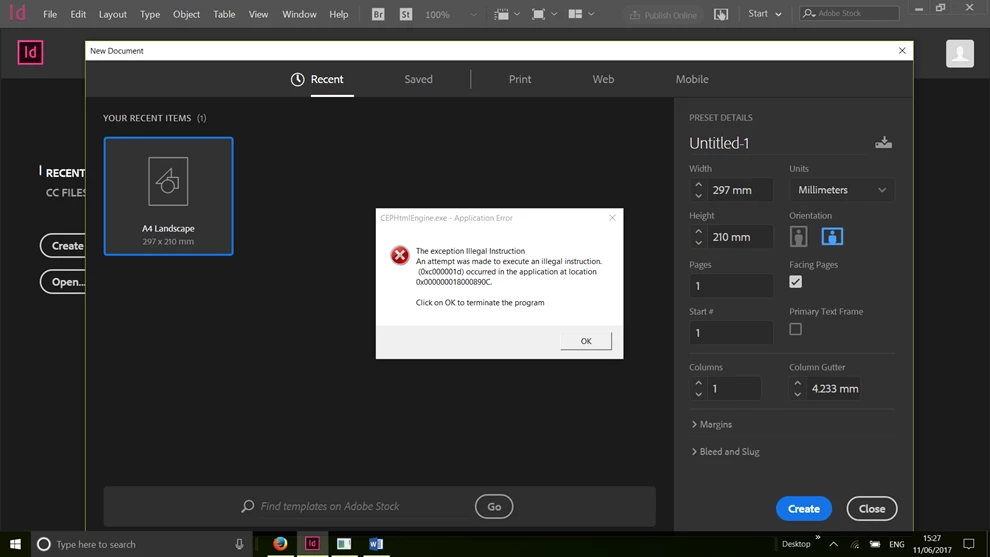
I've just started using Adobe CC applications. Is there a *simple* (For Dummies) way to fix this? (I've tried reinstallation.) Do let me know if you need more information.

Thank you!

James

This topic has been closed for replies.
Correct answer sirmarkdavid

In Photoshop:
Preferences > General
- disable Show "Start" Workspace When No Documents Are Open

Preferences > Plug-Ins

- disable Allow Extensions to Connect to the Internet,

- disable Load Extension Panels

1 reply

Mike Witherell
Community Expert
Community Expert
June 12, 2017

Did you try trashing (resetting) your preferences?

InDesign CC Troubleshooting guide

Mike Witherell
Participant
June 12, 2017

Hi Michael,

Thanks for your help. Yes, I've tried trashing my preferences. After further investigation, I think it may have to do with too many instances of CEP Html Engine running concurrently (according to my Task Manager). I experience the error message with other applications such as Illustrator, too. Is there a way to disable CEP Html Engine?

sirmarkdavid
sirmarkdavidCorrect answer
Participant
September 20, 2018

In Photoshop:
Preferences > General
- disable Show "Start" Workspace When No Documents Are Open

Preferences > Plug-Ins

- disable Allow Extensions to Connect to the Internet,

- disable Load Extension Panels