Answered
Change binding direction
I'm creating a document in Hebrew and need to change the binding direction but can't find this option.
All other ME features are functioning perfectly.

I'm creating a document in Hebrew and need to change the binding direction but can't find this option.
All other ME features are functioning perfectly.
Hi Aman,
I'm working in Hebrew so i don't want to select the Arabic version. At the moment it is English with hebrew, because I need the interface to operate in english but still accommodate Middle eastern features.
Hi ayalak,
Here are some tutorials how you can change direction right to left.
https://indesignsecrets.com/topic/creating-a-right-to-left-book
Arabic and Hebrew features in InDesign
But for this InDesign has to be installed with Hebrew features. Changing the language in the creative cloud will not work for this, first, uninstall the current version and then change the language in the creative cloud and then reinstall InDesign again.
In the app, click three Dot on the top right-hand side.

From the pop-up menu, choose Preferences. In the Preferences dialog box, click Creative Cloud, and then click the App Language pop-up menu.
From the App Language list, choose your language ( "English Hebrew") 
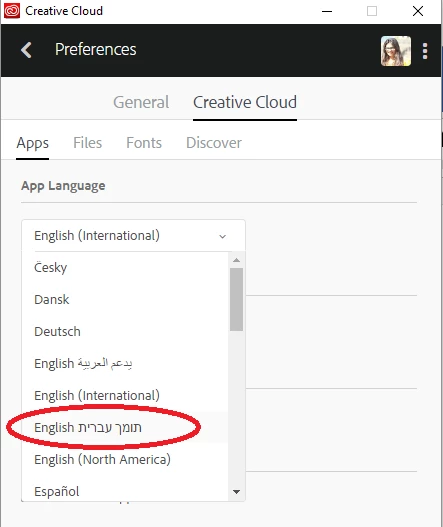
Close the Preferences dialog box.
In the Creative Cloud desktop app, click Apps.
From the list of available software, Illustrator CC 2017 by clicking the Install button.
Once installed you may type in the required language and change the direction.
Regards
Srishti
Already have an account? Login
No account yet? Create an account
Enter your E-mail address. We'll send you an e-mail with instructions to reset your password.


 AdChoices