Participating Frequently
July 12, 2018
Answered

Change case option in running header not working

  • July 12, 2018
  • 5 replies
  • 5106 views

I have a document set up using a running head at the top of each page. The head is set up on my master page using a text variable based on a paragraph style.

When the paragraph style is used on a page, it creates text in all caps. This is what I want.

But when the running head appears on a page, I would like its text to be lower case. I edited the text variable using the supplied options for change case (upper case, lower case, title case, and sentence case) -- and no matter which option I select, the result is the same. The running header still appears in all caps.

Is this normal functionality? Is my document corrupt? Am I doing something wrong?

Thanks for any insight.

    This topic has been closed for replies.
    Correct answer vladan saveljic

    My variable heading is based on a paragraph style, so I have just now included a screen shot showing that style. I changed the style case from All Caps to Normal in the screen shot. Notice that the variable heading did not change to match. (And yes I refreshed the page.)  


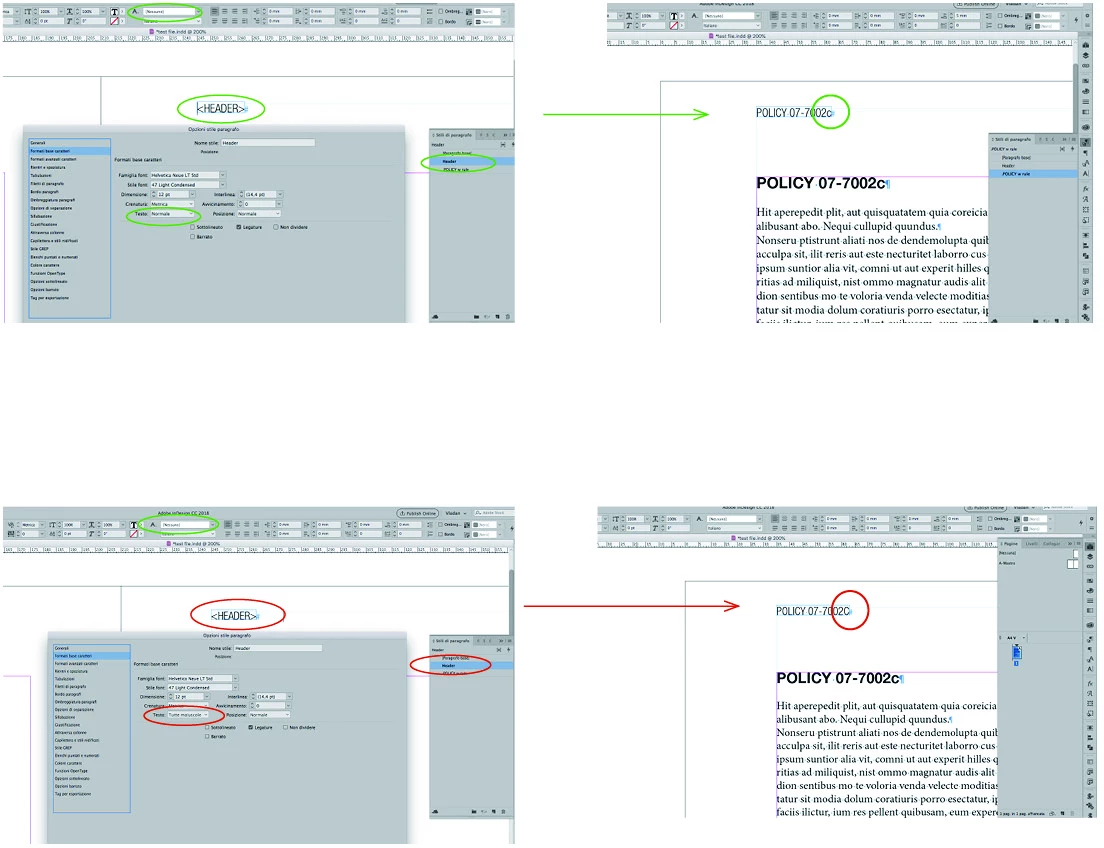
    and how about the screenshot of the paragraph style applied to your running header on the master page?

    (here two possible cases right and wrong)

    5 replies

    Barb Binder
    Community Expert
    Community Expert
    July 12, 2018

    Hi pigfishduck:

    When the paragraph style is used on a page, it creates text in all caps. This is what I want. But when the running head appears on a page, I would like its text to be lower case.

    I don't think the feature is broken, but here's another approach that may be more straightforward.

    Add the title on the body pages using the look you want in the running head (right now they match):

    Then create a paragraph style for the title on the body page, and change the case via the style to All Caps:

    ~Barb

    ~Barb at Rocky Mountain Training
    Participating Frequently
    July 12, 2018

    Barb, thank you very much for your suggestion. Yes, as soon as I followed Vladan's suggestion to check the style applied to the variable on the master page, and saw the 'Normal+' style -- I was alarmed. I recognize that as a Word styling, and normally try to eliminate all of those!

    If I create a paragraph style for the policy name and number and change the case to all caps, as you suggest, won't this include the letter that appears after the policy number? So the text will read 'POLICY 5555C' . Instead of what I want, which is 'POLICY 5555c' .

    That is why I think I need to set up my style as normal text, allow the variable header to pick up its styling from that, and then manually do a search and replace to change the word "Policy'' in the title to "POLICY."  Which is a pain, but I do not see another way, short of involving some GREP stuff which is over my head.

    Participating Frequently
    July 12, 2018

    I have added 3 screen shots to the reply above this one.

    1. Demonstrates problem -- I need the letter circled in red to appear in lower case in the running head variable

    2. Shows my master page

    3. Shows my variable definition

    Thank you vladan saveljic for your suggestions. I experimented by entering the text in all caps using keyboard shift, and by selecting 'all caps' in my paragraph style, and by entering the text in all lower case, but the result is the same. And I selected various options in the Edit Text Variable pane, but the problem remains.vladan saveljic

    Jongware, I am sad to say I think you may be correct and my document is corrupt. I can trash the preferences, but is there anything else I can do? This document is 650 pages long and I do not want to have to manually enter the variable header text!

    Thanks to both of you for your input.

    vladan saveljic
    Inspiring
    July 12, 2018

    ... and do you have a paragraph or character style for youre headers on the master pages?

    Can you show us the tab "Basic Character Format" and character style of your headers on the master pages?

    Participating Frequently
    July 12, 2018

    Participating Frequently
    July 12, 2018

    vladan saveljic
    Inspiring
    July 12, 2018

    can you post the screenshoot of your paragraph style ".POLICY w rule and screen..."?

    (this tab "Basic Character Format")

    and let us know if you have one character style applyed or not

    Jongware
    Community Expert
    Community Expert
    July 12, 2018

    I just tested with the most recent version of InDesign – 13.1 (but it also works correctly in my much older version). It works as advertised . No matter whether the text to be picked up is typed in all-lowercase, all-caps, or (usually) a mix, the options in the Define Variable indeed change the actual case of the text.

    We may need to see your text, variable definition, and perhaps anything else relevant. At the moment it is not clear to me why it should not work for you, which suggests it could be the document (does it work properly in a new document?) or your InDesign's settings got corrupted (which, as I have read on this very forum, can lead to the most weirdest malfunctions I've ever seen in software).

    vladan saveljic
    Inspiring
    July 12, 2018

    https://forums.adobe.com/people/%5BJongware%5D  ha scritto

    ....

    I just tested with the most recent version of InDesign – 13.1 (but it also works correctly in my much older version). It works as advertised . No matter whether the text to be picked up is typed in all-lowercase, all-caps, or (usually) a mix, the options in the Define Variable indeed change the actual case of the text.

    ....

    That's right Jongware
    Probably   didn't change the option here

    vladan saveljic
    Inspiring
    July 12, 2018

    The partagraph style TITLE > set All Caps

    (don't digit all caps with "shift" on your keyboard)

    The paragraph style "Running header" > set "Normal"