
Participant
May 12, 2011
Answered

Change font size of an table with javascript

  • May 12, 2011
  • 1 reply
  • 2954 views

Hello!

i am new to developing in javascript as well as to indesign. i have to make a few changes to an existing script. in a user dialouge i get the font size in which the imported table should be. but how can i change the font size of an table???

please respond as soon as possible. thanks very much in advance.

moketas
This topic has been closed for replies.
Correct answer milligramme

Hi

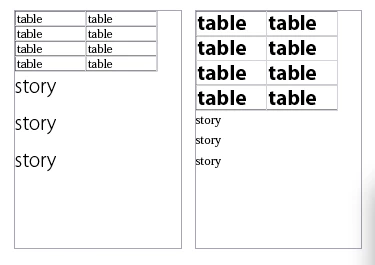
do you want do like this (rightside) ?

To apply font to each cell, you must access TextFrame => Table => Cell => any TextObject

var doc = app.documents[0];

// two textframes, they have a table (2x2)
var tf_one = doc.textFrames[0];
var tf_two = doc.textFrames[1];


//applied to story
tf_one.parentStory.appliedFont = "Myriad Pro\tLight";
tf_one.parentStory.pointSize = 24;
//not effective against table text

//applied to text-object of each cells of table
tf_two.parentStory.tables[0].cells.everyItem().texts[0].appliedFont = "Myriad Pro\tBold";
tf_two.parentStory.tables[0].cells.everyItem().texts[0].pointSize = 24;

thank you

mg.

1 reply

milligramme
milligrammeCorrect answer
Inspiring
May 12, 2011

Hi

do you want do like this (rightside) ?

To apply font to each cell, you must access TextFrame => Table => Cell => any TextObject

var doc = app.documents[0];

// two textframes, they have a table (2x2)
var tf_one = doc.textFrames[0];
var tf_two = doc.textFrames[1];


//applied to story
tf_one.parentStory.appliedFont = "Myriad Pro\tLight";
tf_one.parentStory.pointSize = 24;
//not effective against table text

//applied to text-object of each cells of table
tf_two.parentStory.tables[0].cells.everyItem().texts[0].appliedFont = "Myriad Pro\tBold";
tf_two.parentStory.tables[0].cells.everyItem().texts[0].pointSize = 24;

thank you

mg.