
Inspiring
July 14, 2020
Answered

Change fonts only for korean characters

  • July 14, 2020
  • 2 replies
  • 2028 views

Hi, I have Korean language InDesign file in which there are English and Korean characters.

Univers Font family is used in the complete file but these fonts are not suitable for the Korean language,

Is there any way to find only Korean characters and replace the fonts. please check the below Screenshot.
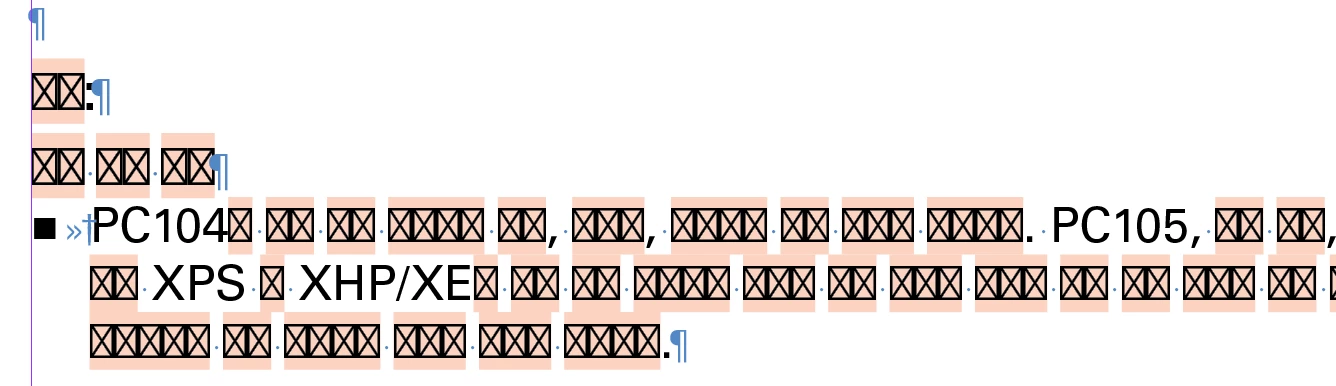
In the above image only red highlighted I,e only Korean characters font should be find and replaced. 

This topic has been closed for replies.
Correct answer John Mensinger

Based on the sample you posted, it looks like it would be easier to assign a proper CJK font and use a GREP style to find and set those PCxxx and Xx patterns to Univers.

2 replies

Ashutosh_Mishra
Inspiring
July 25, 2020

Hi there,


Thanks for reaching out. I hope your issue is resolved now. We'd appreciate if you can mark the appropriate answer correct.

If you used any other method, please share it here. It'll help other users having similar concern.

If you still have issues, let us know. We'll be happy to help.


Regards,

Ashutosh

shawns52137820
Participant
December 6, 2024

How could this be resolved? Did he get a GREP for just Korean text? If so could someone post it?

Joel Cherney
Community Expert
Community Expert
December 6, 2024

Well, no, the suggestion was to write a GREP for the Latin text only. You can do it in either direction, by specifying Unicode ranges. For example, if you want to just capture Latin-script letters only, it'd look something like this:


[\x{0021}-\x{00FF}]+


To capture only Hangul ("just Korean text") would look like a much more complicated regex, but all you'd really be doing is specifying only the Unicode ranges that contain Hangul glyphs. That can get kind of long, and you can get into a bit of a design spiral when you're deciding exactly which punctuation you want to source from the Latin-script font and which you want from the Korean font. Since my files tend to be one-language files, I can just specify "everything outside of ASCII" like so:


[\x{0100}-\x{FFEE}]+


Note that this excludes a few characters at the very end of the Basic Multilingual Plane. One of 'em (U+FFEF) has special purposes in InDesign as the placeholder for things like anchored objects or hyperlink destination, so I've excluded it from my query on purpose. 


But, it's not hard to build language-specific regular expressions for use in InDesign. I shy away from it because, while it's not hard to specify the range for e.g. Greek, things get trickier when someone wants to use this Unicode-value GREP-based system for finding Traditional Chinese, or Simplified Chinese, or Japanese... or all three. That doesn't really work all that well. Likewise, trying to explain Han Unification in a single post, that doesn't work all that well either. Capturing only Korean, by itself, would be quite a long query.


So I, speaking only for myself, think that the regex for just Latin-script text is the easiest thing to do. 

John Mensinger
Community Expert
John MensingerCommunity ExpertCorrect answer
Community Expert
July 14, 2020

Based on the sample you posted, it looks like it would be easier to assign a proper CJK font and use a GREP style to find and set those PCxxx and Xx patterns to Univers.