


Change object style of multiple hyperlinked buttons across all pages
I've got 4 buttons on each page that I need to resize and realign throughout the entire document. I've tried grouping/ungrouping them, then of course assigning an object style. I've done Object Style > Size and Position options. Size set to adjust height and width. The problem occurs with position.
This is what I want them all to look like througout the document:
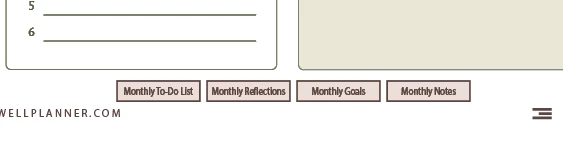
If I adjust X and Y, they bunch together on the X axis like this:

If I adjust only the Y axis, then they're fine but they don't reposition on the next page to the proper X axis for each item. The next page then looks like this:

It's looking like I'm going to have to change the object style for each individual button throughout every page. I'd like to know if there's a way to change all 4 buttons to match the object style and properly position to the same X and Y axis as they are in the original appearance.
I hope this makes sense!
 AdChoices