lunarboy73
Inspiring
April 15, 2011
Answered

Change the page in a placed PDF?

Is there an easy way to change the page in a placed PDF? Something along the lines of Object Layer Options?

Thanks.

JR Boulay
JR BoulayCorrect answer
Community Expert
August 20, 2015

Hi.

You should try my  PDFoptions Editor, it's a free script (in English and French) for InDesign (Direct download link removed by moderator)

See its home page (in French, Google translate is your friend) : http://abracadabrapdf.net/utilitaires/utilitaires-indesign/indesign-pdfoptions-editor/

Clic the red button to download.

It can:

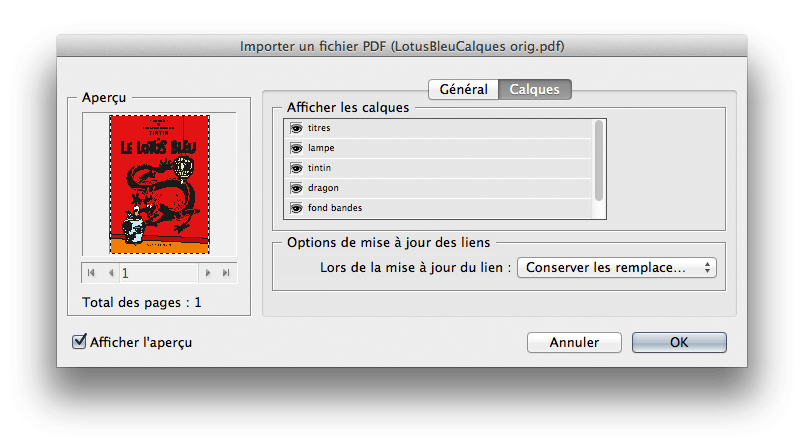
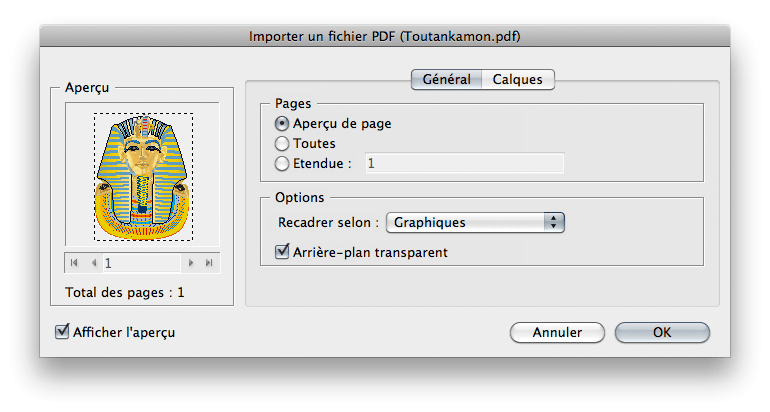
- edit the page,

- edit the background color (white/transparent),

- edit layers visibility.

hybrid-import-INDD.png

pdfoptionsFR.png

Acrobate du PDF, InDesigner et Photoshopographe

15 replies

Community Expert
November 4, 2019

FWIW: John's two-line ExtendScript ( JavaScript ) script is working as well.


Regards,
Uwe Laubender

( ACP )

Translate
Participating Frequently
October 31, 2019

JR Boulay has the correct answer. SO MUCH QUICKER.

Merci beaucoup!

Translate
JR Boulay
Community Expert
Community Expert
August 29, 2015

It don't matter.

Translate
Acrobate du PDF, InDesigner et Photoshopographe
JR Boulay
Community Expert
Community Expert
August 27, 2015

(Direct download link removed by moderator)

???

Translate
Acrobate du PDF, InDesigner et Photoshopographe
Peter Spier
Community Expert
Community Expert
August 27, 2015

Apparently one of the other moderators felt the link was spam.

Translate
JR Boulay
Community Expert
Community Expert
August 28, 2015

I'm an ACP, he should read my history first…

Translate
Acrobate du PDF, InDesigner et Photoshopographe
JR Boulay
Community Expert
JR BoulayCommunity ExpertCorrect answer
Community Expert
August 20, 2015

Hi.

You should try my  PDFoptions Editor, it's a free script (in English and French) for InDesign (Direct download link removed by moderator)

See its home page (in French, Google translate is your friend) : http://abracadabrapdf.net/utilitaires/utilitaires-indesign/indesign-pdfoptions-editor/

Clic the red button to download.

It can:

- edit the page,

- edit the background color (white/transparent),

- edit layers visibility.

hybrid-import-INDD.png

pdfoptionsFR.png

Translate
Acrobate du PDF, InDesigner et Photoshopographe
Participant
November 14, 2023

Hello.

I can´t find the link to download the plugin. When I download it, it opens a PDF with no link.


I appreciate the help

Translate
Participating Frequently
November 14, 2023

I think the newest Acrobat reader breaks the download link which used to be (visible) within the PDF document.

Hit the Bookmarks tab (second icon down on the right column margin) and hit the red "Extract PDFoptions editor" link - you'll be asked where to extract the .jsx file to ( - follow the Installation instructions in the PDF page)

Translate
Peter Spier
Community Expert
Community Expert
April 15, 2011

Re-link, but this time show import options and choose the correct page.

Translate
lunarboy73
Inspiring
April 15, 2011

Thanks, Peter!

I know I can do that. Unfortunately that can be quite cumbersome if I have a large multi-page PDF, and/or a long list of links in a folder.

There's nothing you know of that's easier to do?

Translate
Peter Spier
Community Expert
Community Expert
April 15, 2011

No

Translate