
Known Participant
October 28, 2023
Question

Change the Path script

  • October 28, 2023
  • 3 replies
  • 940 views

Dear all,


I have been using a script by Kasyan Servetsky for changing the link's path when I have to move my file to the hard drive to save cloud space.

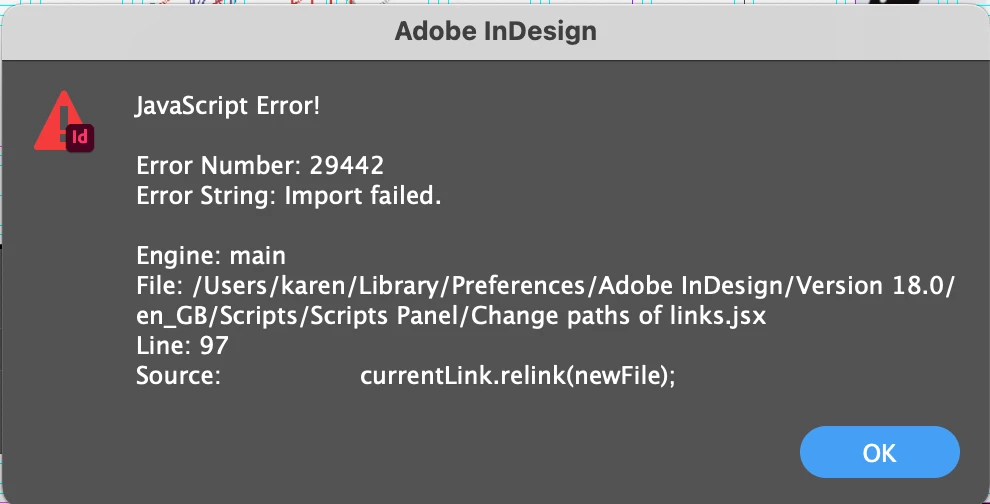
This link has worked perfectly fine for the past few years, until today I tried to relink the file for my portfolio again, and it is showing this error. I tried deleting the scripts and restarting InDesign, and it still shows the same error. I don't have much knowledge, so I couldn't see why the code wasn't working.


Does anyone have an idea what is happening here?

Thank you.


Karen
 

This topic has been closed for replies.

3 replies

willcampbell7
Legend
November 8, 2023
rob day
Community Expert
Community Expert
October 29, 2023

From the error dialog you posted, it looks like there is a newer version of @Kasyan Servetsky ’s script—see this page:


http://kasyan.ho.ua/indesign/link/restore_paths_of_links.html


The new dialog looks like this:


Karen JRAuthor
Known Participant
November 5, 2023

Hi! I downloaded the new version of the script and opened it in InDeisgn, the dialogue is still the same one I had before, not the one like your screenshot which I'm not sure why.

Additionally, the new script also shows the same error with this line of code,

currentLink.Relink(newFile);


Robert at ID-Tasker
Legend
November 5, 2023

Can you show us an example of the full path to your linked files ?


rob day
Community Expert
Community Expert
October 28, 2023

Hi Karen, the script is relinking the newFile to update the link—you can’t just change the filePath to relink. The error seems to from the relink command failing. Can you successfully relink the missing file manually from the UI?

Karen JRAuthor
Known Participant
October 28, 2023

Hi Rob, I can manually relink each link but I always use this script to change the file path when I have to put my files on a hard drive. One document can contain hundreds of links there is no way I can relink everything manually which is why I found this script that can help me relink all the paths. I didn't understand why it didn't work all of a sudden.

Robert at ID-Tasker
Legend
October 29, 2023

But have you tried relinking some files to the same folder as when using script? 


Are you on a Mac? Have you updated OS recently? Do you have write permission to the destination folder?