


Answered
Change ToC font size and line spacing using Javascript
I'm using InDesign CS5.5 and the ExtendScript Toolkit 4.1.28
I want to change the color, size and line spacing of a ToC after the update
I used
var toc = ... // my Story
toc.textContainers[0].select()
app.menuActions.item("$ID/UpdateTableOfContentsCmd").invoke();

toc.texts[0].fillColor = "Black"; // it Works

toc.texts[0].appliedParagraphStyle.pointSize = 7; // applied only to the first row
var parStyle = toc.texts[0].appliedParagraphStyle;
parStyle.pointSize = 7;
toc.texts[0].applyParagraphStyle(parStyle); // Applied to all, but the entire style including underline and so on, not only the font size

var paragraphs = toc.paragraphs
for (var i = 0 ; i < paragraphs.length; i++ ) {
     paragraphs[i].appliedParagraphStyle.pointSize = 7; // not working
     }
How can I set the font size and the line spacint to the entire object? (title + ToC)
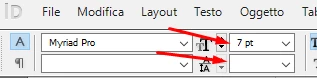
Manually i enter in the textBox, I click Ctrl+A (Select ALL) and I use the two forms as shown
Thanks
 AdChoices