ali u
Inspiring
April 7, 2023
Answered

changing Diacritic Positioning Additional Adjustment values (horizontal and vertical) via script

  • April 7, 2023
  • 2 replies
  • 1550 views

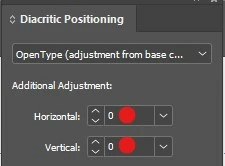
Is it possible to change these values with a script?
This topic has been closed for replies.
Correct answer Peter Kahrel

.diacriticPosition sets the mode. To finetune positioning (the Horizontal and Vertical fields indicated in the screenshot), use .xOffsetDiacritic and .yOffsetDiacritic.


P.

2 replies

Peter Kahrel
Community Expert
Peter KahrelCommunity ExpertCorrect answer
Community Expert
April 7, 2023

.diacriticPosition sets the mode. To finetune positioning (the Horizontal and Vertical fields indicated in the screenshot), use .xOffsetDiacritic and .yOffsetDiacritic.


P.

ali u
ali uAuthor
Inspiring
April 7, 2023

Thank you very much.

m1b
Community Expert
Community Expert
April 7, 2023

Hi @ali u, I don't have Arabic or Hebrew to test with, but when I had a look around in the scripting API, all I could find is DiacriticPositioningOptions which is not exactly what you want, but might be useful. If you select some text, a script could be:

var text = app.activeDocument.selection[0];
if (text.hasOwnProperty('diacriticPosition')) {
    text.diacriticPosition = DiacriticPositionOptions.LOOSE_POSITION;
}

If that doesn't help, we'd better wait for an expert. 🙂

- Mark
