
Participant
June 20, 2023
Answered

Changing height of image and its frame at the same time

  • June 20, 2023
  • 2 replies
  • 437 views

Hello,

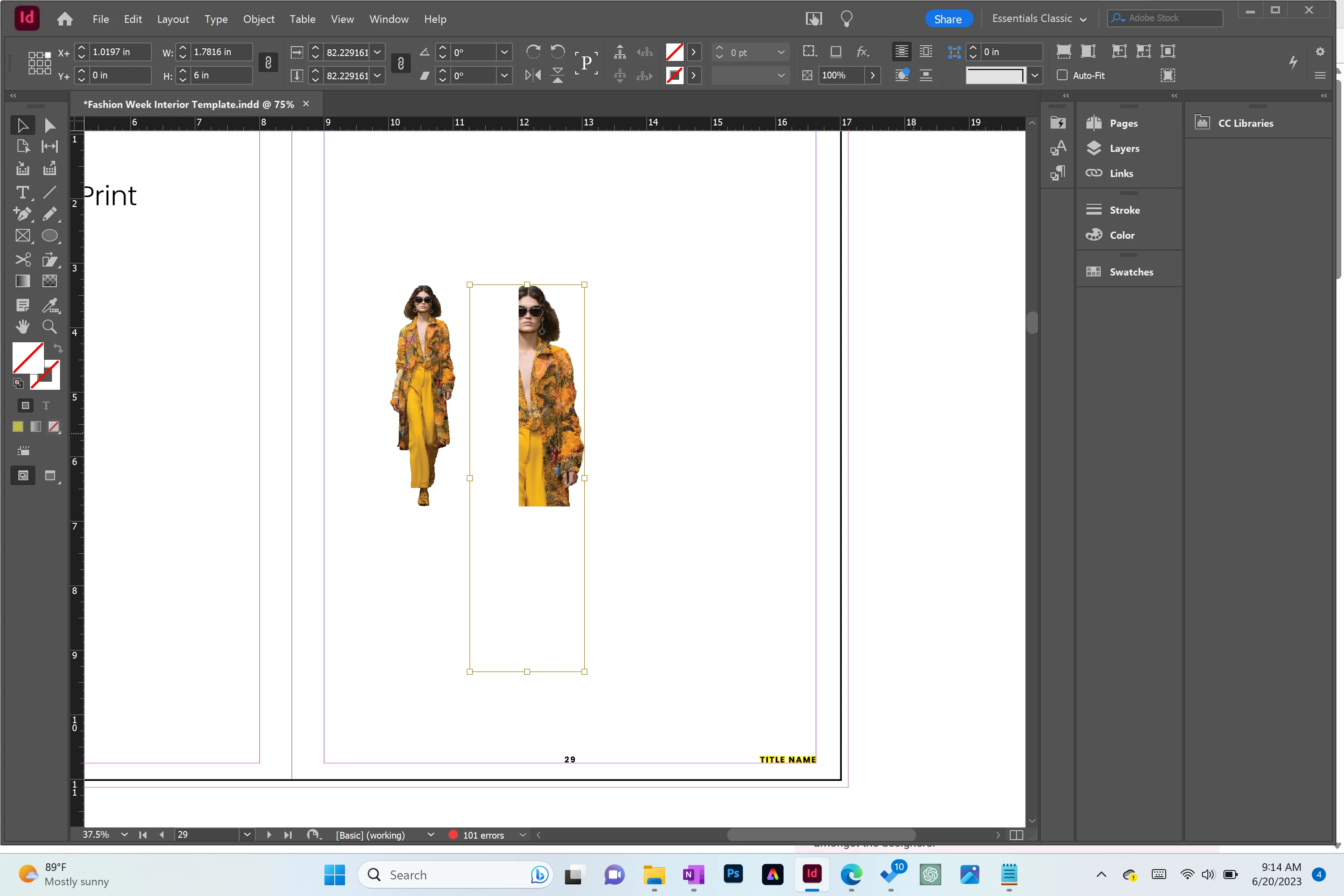
Does anyone know how to change the size of an image and its frame at the same time? In my attachment, you can see the image to the left is 3.5". I want to resize it to 6" as you can see on the right. I'm not sure why the image resized ok but not the frame. 


I understand I can free transform both image and frame by holding CNTL+SHIFT but I'd prefer to enter the height manually.


Can anyone assist with this?

Thank you for your time in advance!!
 

This topic has been closed for replies.
Correct answer Dave Creamer of IDEAS

Turn on Auto Fit. When you resize the frame, the image should resize along with it. 


2 replies

Dave Creamer of IDEAS
Community Expert
Dave Creamer of IDEASCommunity ExpertCorrect answer
Community Expert
June 20, 2023

Turn on Auto Fit. When you resize the frame, the image should resize along with it. 


David Creamer: Community Expert (ACI and ACE 1995-2023)
Nic011Author
Participant
June 20, 2023

Thank you so much! I really appreciate it 🙂

jmlevy
Community Expert
Community Expert
June 20, 2023
  • Select the frame with the selection tool (the arrow which is selected on your screenshot).
  • Enter the desired value 6" in the percentage field