Known Participant
July 26, 2018
Answered

Changing $(ID_SDK_DIR)

  • July 26, 2018
  • 2 replies
  • 551 views

This might be a stupid question because I feel I have missed something obvious, but anyway: Where can I change $(ID_SDK_DIR)? Right now it's pointing to E:\SDK\plugin but needs to be E:\SDK\plugin_sdk_076\plugin.

Can anyone point me to the place where I can find/change the definition?

EDIT: $(ID_SDK_DIR) is of course the macro name in Visual Studio. I'm looking to change what is referenced as <SDK> in the "Getting Started with InDesign Development" doc in the InDesign SDK.

Thank you very much.

Hans
This topic has been closed for replies.
Correct answer Manan Joshi

Hi Hans,

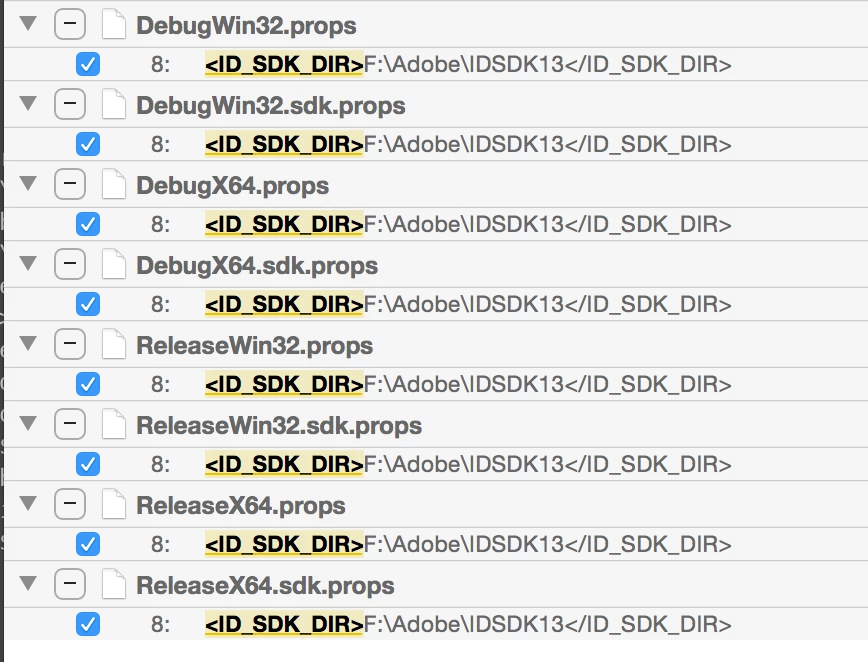
I suppose you are using the SDK supplied props file to set up your project. If this is the case then these macros are defined in the target specific props file, you will have to change the value in these files. Attaching a list of all the files that have this macro defined and thus needs to be changed.

2 replies

HansSH04Author
Known Participant
August 9, 2018

Thanks a lot! That's probably the solution I was looking for. I managed to get the right path in the meantime by creating  a new project.

Hans

Manan JoshiCommunity ExpertCorrect answer
Community Expert
August 8, 2018

Hi Hans,

I suppose you are using the SDK supplied props file to set up your project. If this is the case then these macros are defined in the target specific props file, you will have to change the value in these files. Attaching a list of all the files that have this macro defined and thus needs to be changed.

-Manan