
Inspiring
November 14, 2023
Answered

Changing the colour of frames and texts edges

  • November 14, 2023
  • 4 replies
  • 550 views


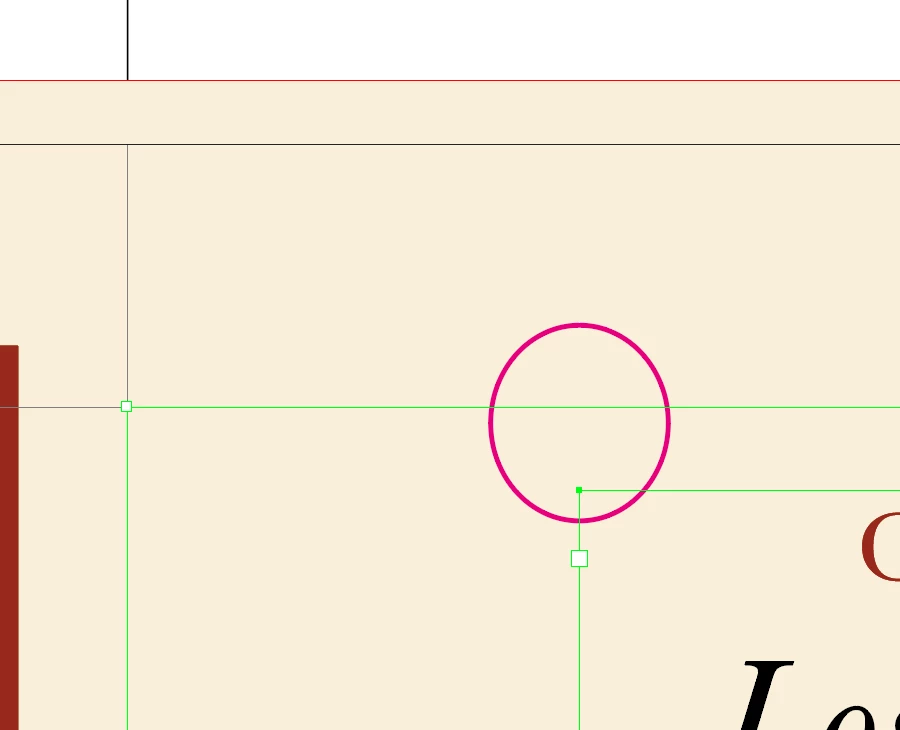
The default soft tone that ID applies blends in with the backgrounds as shown in the sample.

Is it possible to change it?

The picture doesn't show the problem properly because of a scaling issue:
This topic has been closed for replies.
Correct answer James Gifford—NitroPress

Those frames and guides take their color from the ID color of the current layer. Change the layer color to something with better contrast for your display and work. 

4 replies

Inspiring
November 15, 2023

Inspiring
November 15, 2023

Solved. It was the color of the layer...

And surely, retina displays are a calamity. A small mismatch and black tones at 10% disappear.

All three answers are wise and perfect. As I can't give all three the honor I will do it with the first answer.

But appreciation and pointing out the generosity is more so.

Lukas Engqvist
Community Expert
Community Expert
November 14, 2023

There are some dissadvantages with a retina monitor 😉 What I do with guides/grid is to create a new layer that I set to non-printing and block out to create areas instead of guides. Non printing layers are hidden when you preview, export and/or print. But also as @James Gifford—NitroPress  said change the colour of the layer to someting that works for you.

Willi Adelberger
Community Expert
Community Expert
November 14, 2023

To change the color of the backgraund as far as no object color is there can be changed. Go to the Swatches panel, click twice on [Paper] swatch and change its clor. This color wil not be printed. This function is to simulate colored paper on screen.

The color of frames and guides is defined per layer, when you click on the layer entry you can choose another color.

James Gifford—NitroPress
Legend
November 14, 2023

Those frames and guides take their color from the ID color of the current layer. Change the layer color to something with better contrast for your display and work.