Legend
July 29, 2018
Answered

characters in text cause overset

  • July 29, 2018
  • 3 replies
  • 524 views

Hi. I'm working on an API for a client, and keeping change log notes on the pasteboard. When I paste in the programmer's notes to a text box, they cause an overset in the text box (fig 1).
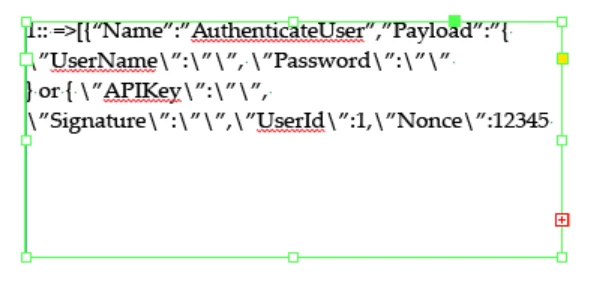
There are no nearby graphics or text wraps involved -- pure text box in a wide-open area of the pasteboard.

When I look at the text in the Story Editor, the overset is plain (fig 2):
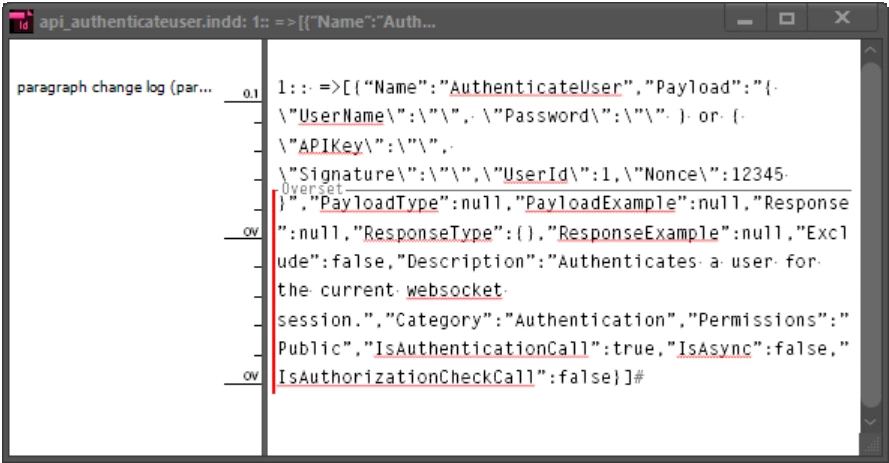
I don't think it's Word formatting that is causing the problem. I have pasted the text into NotePad and saved it, and then copied the text from NotePad and pasted the "plain" text into the text box, and get the same result at the same point. I think it's the characters being used in the text provided by the programmer that is causing the overset, but I don't understand why. What do I have to change to get this text to paste into a plain text box?

Thanks.

This topic has been closed for replies.
Correct answer Malcolm Whild

Hi,

I think it's because there are no spaces until you get to Description. Indesign cannot fit all of that text on one line so becomes overset.

Ha - looking again I see that there is a space after "12345" but the next line can't fit because the next space is after "Authenticates".

Regards,

Malcolm

3 replies

Participating Frequently
July 29, 2018

Good work!

To be fair to programmers, there are reasons why they sometimes can't use spaces. But yes - it's tricky when you're trying to format their code.

Regards,

Malcolm

NedlawAuthor
Legend
July 29, 2018

It was a Simpson's "DOH!" moment. There was plenty of text box (I reduced the size of the text box for the image capture, it wasn't a simple case of "it won't fit"), but even so, overset took place after the numbers even with a vastly larger text box. Simply putting a few spaces in after the commas (why do programmers abhor spaces?) freed up the paragraph to flow, and the overset went away.

To solve the problem more completely, I went to the Word source doc and did a search-and-replace to add space around the commas. Now my cut-and-paste doesn't result in inexplicable oversets.

Thanks, Malcolm.

Malcolm WhildCorrect answer
Participating Frequently
July 29, 2018

Hi,

I think it's because there are no spaces until you get to Description. Indesign cannot fit all of that text on one line so becomes overset.

Ha - looking again I see that there is a space after "12345" but the next line can't fit because the next space is after "Authenticates".

Regards,

Malcolm