
Known Participant
March 6, 2023
Question

Check whether the images are inside the tables

  • March 6, 2023
  • 3 replies
  • 599 views

Hi,


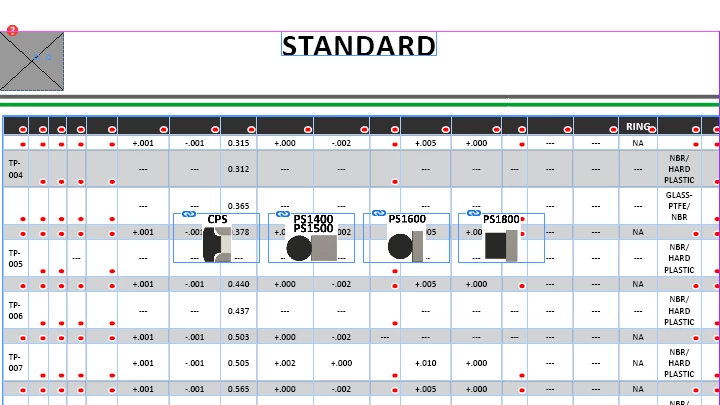
I wanted the images to be at the end of the page. However, the table is currently overlapped with the images. What are the steps I need to follow in the script in order to accomplish this? Please guide me on this


This topic has been closed for replies.

3 replies

m1b
Community Expert
Community Expert
March 6, 2023

Hi @Barathi, this is the best way to get answers about scripts you are running:


1. Post a simple example document that shows your problem. In your case this should be a small, simple table, with no messy overflows and that just shows the issue with the image positions.

2. Post simplified code that can be run on your example document to show the problem.

3. Post an example document, or screen shot, of your example from step 1, but showing what you want the result to be, ie. where the graphics should be positioned.


If you follow those steps, I'm confident you will get a quick answer that will solve your problem, if it is solvable.

- Mark

BarathiAuthor
Known Participant
March 27, 2023

Hi @m1b ,

I have just fetched all the images in the InDesign Document. I wanted the images to be at the end of the active page. However, the table is currently overlapped with the images. What are the steps I need to follow in the script in order to accomplish this? Please guide me on this. I have attached the script and the "expected output File" indesign document


// Define an empty object to hold the images by page number
var imagesByPage = {};
var folderPath
// Get a reference to the active document
var myDocument = app.activeDocument;

// Loop through each page in the document
for (var i = 0; i < myDocument.pages.length; i++) {
  // Get a reference to the current page
  var currentPage = myDocument.pages[i];

  // Create an empty array to hold the image names on this page
  var imageNamesArray = [];

  // Loop through each item on the current page
  for (var j = 0; j < currentPage.allPageItems.length; j++) {
    // Get a reference to the current page item
    var currentItem = currentPage.allPageItems[j];
    // Check if the current item is an image
    if (currentItem.constructor.name == "Image") {
      // Push the image name to the image array
      imageNamesArray.push(currentItem.itemLink.name);
    }
  }
var activePage = app.activeWindow.activePage;
var activePageNum = activePage.documentOffset;
  // Add the image names array to the imagesByPage object using the page number as the key
  imagesByPage[currentPage.name] = imageNamesArray;
  if(imagesByPage[currentPage.name] != [] && imagesByPage[currentPage.name] != "" && imagesByPage[currentPage.name] != null)
  {
    var frameWidth = 100;
    var frameHeight = 50;
    var frameX = 10;
    var frameY = 10;

    // Loop through each image on the page
    for (var k = 0; k < imageNamesArray.length; k++) {
      // Create a new text frame for the image
      var newFrame = app.activeDocument.pages[activePageNum].textFrames.add({
        geometricBounds: [frameY, frameX, frameY + frameHeight, frameX + frameWidth]
      });

var getFolderPath = FolderPath();
getFolderPath
        var placedItem = newFrame.place(getFolderPath +"/"+ imageNamesArray[k]);
    //  placedItem.fit(FitOptions.PROPORTIONALLY);
    }
  frameX += frameWidth + 10;
    }

}
function FolderPath()
{// Get the active document

var doc = app.activeDocument;

// Loop through all the links in the document
for (var i = 0; i < doc.links.length; i++) {
  var link = doc.links[i];

  // Get the file path of the linked image
  var filePath = link.filePath;

  // Create a File object from the file path
  var file = new File(filePath);

  // Get the folder path of the file
   folderPath = file.parent.fsName;

  // Log the folder path to the console
}
return folderPath;
}


m1b
Community Expert
Community Expert
April 17, 2023

Hi Barathi, you're doing great with your script. Because your script requires placed images, please package up your sample .indd file and include those images. As it stands now, your script fails due to them being missing. Also your "before" and "after" indesign files aren't the same? One has a larger table.


At this stage I can't understand what you are doing. Are you just trying to move existing linked graphics into a set position on the page? If so, then your sample files should *only* have those graphics—no tables or messy stuff, unless it has bearing on the issue.

- Mark

Robert at ID-Tasker
Legend
March 6, 2023

If the images are "floating" freely on the page(s) - not much you can do.


The best would be to either make them Anchored / InLine in another TextFrame below the TF with the Table - and then turn on TextWrap for the TF with the Table - or put those images - as Anchored / InLline - in the same Story - AFTER the Table.


But if the Table is spanning between pages - anchor them withing the Table and push them down in Anchored Object options.


Mike Witherell
Community Expert
Community Expert
March 6, 2023

Would you post your script?

Mike Witherell