
Choose bigger space between 2 paragraphs: how?
Good day everone 😃
Can you please help me? A company made a request to create certain spaces between paragraphs in their manuals. There are plenty of styles but the spaces are strictly written in their guidbook (which is ubsolutely new and has no InDesign files yet so I have to create one).
What the want is to have 8 mm before the Headers1 and 8 after. 6 mm before and after for Header2. And so on.
When it comes to H1 and H2 stand together they have 12mm space (8+6). What I need is: 8 mm. I want to program to choose the bigger number and use it shile ignoring the lesser. Is it even possible?
Becase the text is messy with lost of crazy indents for Commentaries, Images and so on... And the customer wants specific spaces between paragraphs. Its pretty hard to check every Paragraph and delete spaces after manually or redefine the last paragraph with the style without indent after if the next style has bigger space before the text. There must be a way to make it work without extra check? )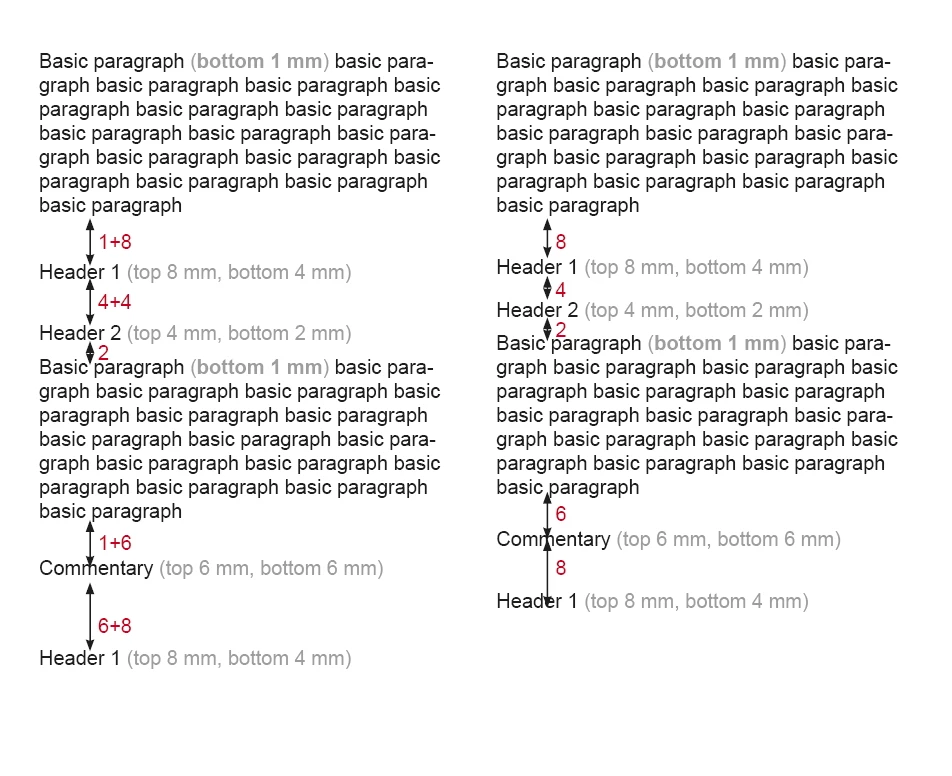


 AdChoices