
Participant
June 12, 2023
Answered

Choosing the Right Approach for Illustrations in Adobe InDesign

  • June 12, 2023
  • 2 replies
  • 697 views

Hello everyone,

I am currently creating a document in Adobe InDesign. Each page of this document contains text along with a technical illustration that accompanies the text.

These illustrations are not tremendously complex but are relatively detailed.


My question is as follows:
What is the best way to create these illustrations in InDesign?


I have considered several options:

  • Creating each illustration in its own Illustrator file and then importing the files one by one.
    (However, this option doesn't allow me to change the colors of all the illustrations without having to open each Illustrator file individually.)
  • Creating all the illustrations in a single Illustrator file and then importing them into InDesign.
    (But since I have more than 50 illustrations to create, the layer system in Illustrator will quickly become messy.)
  • Creating the illustrations directly in InDesign.
    (However, InDesign is not designed for creating illustrations, and its tools are less convenient for this purpose.)


So far, none of these solutions suit me. Do you have any other suggestions and/or solutions to my problems?


Thank you for your time.

Best regards,

FK
This topic has been closed for replies.
Correct answer Steve Werner

It probably depends on how many illustrations you will have.


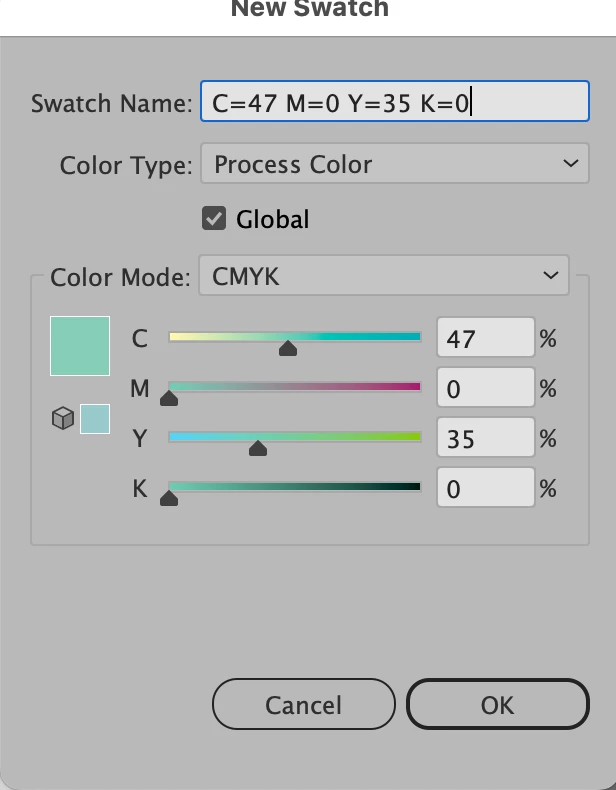
This may help: InDesign can place Illustrator files which contain multiple artboards. When placing if you check Import Options, you'll have a chance to choose an individual artboard from the Illustrator file. So you could have multiple illustrations in an single Illustrator document which you're placing. This is what helps: All of the artboards share the same Swatches panel. So if you changed the one swatch color shared by the artboards, all of them would be changed at the same time. (The swatch colors need to be saved as Global colors - see screen capture.)


2 replies

John Mensinger
Community Expert
Community Expert
June 12, 2023
quote
  • Creating all the illustrations in a single Illustrator file and then importing them into InDesign.
    (But since I have more than 50 illustrations to create, the layer system in Illustrator will quickly become messy.)


You wouldn't have to put each illustration on its own layer; you could have 50 separate artboards. You would then be able to make later color, line-weight, etc., changes across all 50, and they would all update the next time the InDesign file, where they are linked, is opened.


Participant
June 13, 2023

Indeed, this seems to be the best way.
Thank you very much for your answer!

Steve Werner
Community Expert
Community Expert
June 12, 2023

InDesign is not nearly as good as Illustrator for creating illustrations.


The best way is to create the files in Illustrator, and save them as AI files (Illustrator's native format). Then in InDesign choose File > Place for each illustration. Each illustration will be linked in InDesign. It's easy to change the illustration when you need to. Choose Edit Original from the Links panel and it will open immediately in Ilustrator so you can edit it. When you save changes, the link will be immediately updated in InDesign.

Participant
June 12, 2023

Thank you very much for your response.


If I understand correctly, you advise me the following solution:
Create each illustration in separate Illustrator files and then import them into InDesign.


I really like this solution, but there is a small issue remaining. If all my illustrations contain specific colors and one day one of these colors needs to be changed, I would have to open each illustration one by one to modify that particular color in each file...

Is there a solution where these Illustrator files can remain "connected" to each other so that I can modify the shade in just one file?

Legend
June 12, 2023

That would really be a question for Illustrator experts. InDesign can keep the connection to Illustrator but it doesn't give any more than this. Mixing apps in this way is the usual way to prepare documents. If you can bulk-edit multiple Illustrator files, then linked InDesign graphics all update.