
Participating Frequently
May 31, 2023
Answered

Clean up, paragraph line break + end of story #

  • May 31, 2023
  • 3 replies
  • 620 views

Hi,
I have looked for an answer many times, but it seems like it is impossible. I want to clean up a document (made of someone else), that has lots of paragraph line break and then the end of story-symbol #. Is it possible to make this:
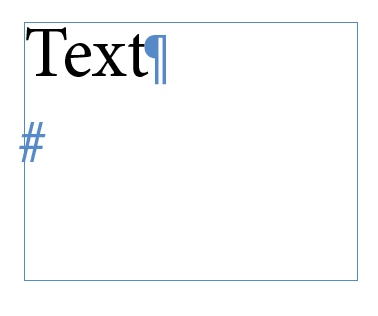
 

change to this:
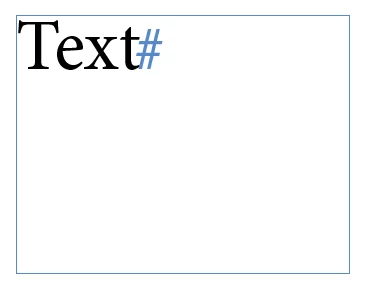
by using a script or maybe by using Find/Change?


Thanks!

This topic has been closed for replies.
Correct answer Peter Spier

You can use a GREP find/change.

find \s+\z and leave the change field blank.

3 replies

Peter Spier
Community Expert
Community Expert
May 31, 2023

There's a small. but important differnce between the pre-installed GREP nand what I posted.

My GREP removes whitespace only at the end of the story, which was the request. The pre-installed expression removes trailing whitespace at the end of all pararagraphs. Most times I would say this is more useful, but since Adobe didn't see fit to include End of Story as one of the locations you can select from the @ menu in the dialog I thought it would be useful to show it: \z

Willi Adelberger
Community Expert
Community Expert
May 31, 2023

There is in find and replace a preset, Remove trailing spaces and other to clean up text preinstalled. Use that. 

reddhareAuthor
Participating Frequently
May 31, 2023

Thank you, but I cant seem to find that preset. Can you take a screenshot? The problem was solved using Peter's sullotion, but just curious on this one as well 🙂

Willi Adelberger
Community Expert
Community Expert
May 31, 2023

Here are all stored presets. You can add your own:

Peter Spier
Community Expert
Peter SpierCommunity ExpertCorrect answer
Community Expert
May 31, 2023

You can use a GREP find/change.

find \s+\z and leave the change field blank.

reddhareAuthor
Participating Frequently
May 31, 2023

Thank you so much! 🙂