

dublove
Legend
January 1, 2025
Answered

Clearing the “clearOverrides(Priority Options?)” code does not work

  • January 1, 2025
  • 2 replies
  • 867 views


I've tried some codes on the internet and they all failed. There doesn't seem to be any online for individual tables.

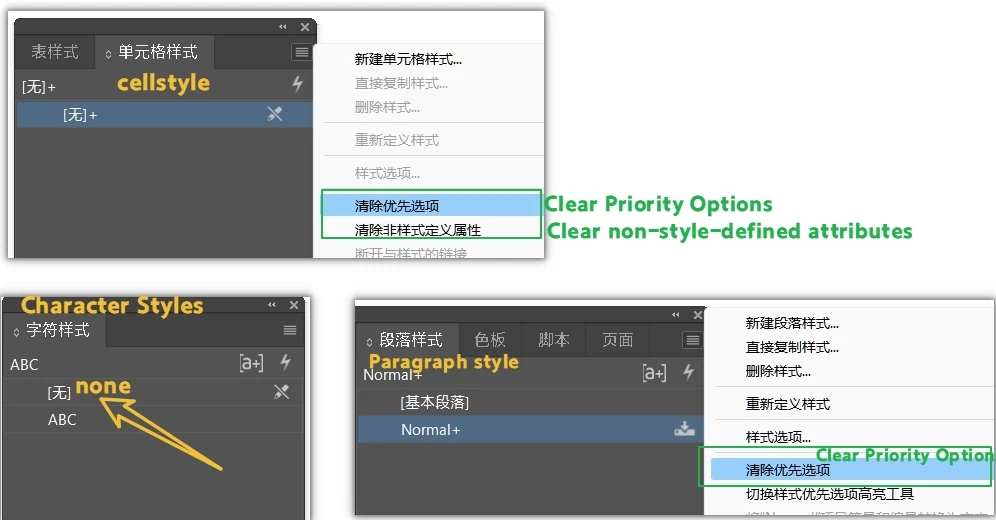
A. I am trying to clear the table style “Preferred Options”.
B, cell styles “preferred options”, “non-custom style properties”.
C. Paragraph styles “Preferred Options”.
D. Apply character style “none”.


For example, this sentence wants to clear the cell style priority.


myTable.everyItem().cells.everyItem().paragraphs.everyItem().clearOverrides(myOverrideType);


I have a feeling it's the front of clearOverrides that's wrong.
Someone would like to point it out.


Here's a script that's a little complicated.
Is there anything that can be done in a couple of sentences?

https://raw.githubusercontent.com/grefel/clearOverrides/refs/heads/master/ClearStyleOverrides.jsx


I added these two lines and it seemed to work, but the “undefined style attribute” was not cleared.


myTable.clearTableStyleOverrides();
myTable.cells.everyItem().clearCellStyleOverrides();


Correct answer jeny_0174

Hello,


Your goal of clearing table, cell, and paragraph styles and applying the "None" character style efficiently, here's a streamlined script in Adobe InDesign scripting (JavaScript): 

// Clear table style overrides
myTable.clearTableStyleOverrides();

// Clear cell style overrides
myTable.cells.everyItem().clearCellStyleOverrides();

// Clear paragraph style overrides
myTable.cells.everyItem().paragraphs.everyItem().clearOverrides();

// Apply "None" character style
var noneCharStyle = myDocument.characterStyles.itemByName("[None]");
myTable.cells.everyItem().paragraphs.everyItem().appliedCharacterStyle = noneCharStyle;

Clear Table Style Overrides: myTable.clearTableStyleOverrides(); removes table-level overrides.
Clear Cell Style Overrides: myTable.cells.everyItem().clearCellStyleOverrides(); clears all cell-level styles.
Clear Paragraph Style Overrides: myTable.cells.everyItem().paragraphs.everyItem().clearOverrides(); removes any overrides applied to paragraphs in the table.
Apply "None" Character Style: This ensures no character styles are applied, setting the text to the default "[None]" style.

Replace myTable with your specific table reference in the script.
Ensure your document is correctly referenced with myDocument.
"[None]" is the default character style name in InDesign, so this line works universally.

If "undefined style attributes" persist, ensure no conflicting custom styles are being reapplied afterward. This script should comprehensively reset all styles in a clean and efficient manner.

2 replies

jeny_0174Correct answer
Participant
January 1, 2025

Hello,


Your goal of clearing table, cell, and paragraph styles and applying the "None" character style efficiently, here's a streamlined script in Adobe InDesign scripting (JavaScript): 

// Clear table style overrides
myTable.clearTableStyleOverrides();

// Clear cell style overrides
myTable.cells.everyItem().clearCellStyleOverrides();

// Clear paragraph style overrides
myTable.cells.everyItem().paragraphs.everyItem().clearOverrides();

// Apply "None" character style
var noneCharStyle = myDocument.characterStyles.itemByName("[None]");
myTable.cells.everyItem().paragraphs.everyItem().appliedCharacterStyle = noneCharStyle;

Clear Table Style Overrides: myTable.clearTableStyleOverrides(); removes table-level overrides.
Clear Cell Style Overrides: myTable.cells.everyItem().clearCellStyleOverrides(); clears all cell-level styles.
Clear Paragraph Style Overrides: myTable.cells.everyItem().paragraphs.everyItem().clearOverrides(); removes any overrides applied to paragraphs in the table.
Apply "None" Character Style: This ensures no character styles are applied, setting the text to the default "[None]" style.

Replace myTable with your specific table reference in the script.
Ensure your document is correctly referenced with myDocument.
"[None]" is the default character style name in InDesign, so this line works universally.

If "undefined style attributes" persist, ensure no conflicting custom styles are being reapplied afterward. This script should comprehensively reset all styles in a clean and efficient manner.

dublove
dubloveAuthor
Legend
January 1, 2025

Thank you very much.
This basic, universally applicable stuff is so important.
Thanks for sharing such great tips.

Legend
January 1, 2025

Not sure whether that solves your problem, but clearCellStyleOverrides() has an optional argument.


dublove
dubloveAuthor
Legend
January 1, 2025

How do I use it?

myTable.cells.everyItem().clearCellStyleOverrides(optional);
 
tip-off error:
optionalisundefined
optionalisundefined
 
Legend
January 1, 2025

The parameter is a boolean. Use true or false.

That (Optional) means you can leave the parameter out, as you initially did.

Unfortunately the description does not tell whether true or false is the default.