


Known Participant
October 16, 2024
Answered

Clipping of InDesign table

  • October 16, 2024
  • 2 replies
  • 922 views

Hi,


I have a InDesign table that I want to be able to clip as per the yellow highlighted bounding frame. The overset indicator on the bottom is correctly clipping the table rows, but on the column it is not. Is it possible to do so in InDesign and if yes, how do I achieve it?
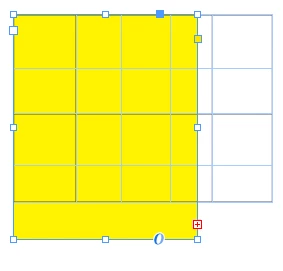
 

The use case is to print only the specific parts of the table


Thanks,

This topic has been closed for replies.
Correct answer BobLevine

That's the way tables behave. You'll need to cut the frame holding the table and paste it into another frame to accomplish what you want.

2 replies

Vivek-Sharma
Community Manager
Community Manager
October 16, 2024

Hi, Thank you for contacting us. To resolve the clipping issue of tables in InDesign, please try the following:
Place the Table in a Frame
Use Object Clipping:
Mask with Another Frame

Helpful links:-
Modify, mask, and export objects and frames
Select and edit tables


^VS

asaxenaAuthor
Known Participant
October 16, 2024

When I select the frame in which the table was placed, I get only "Fit Frame to Content" option. Can you please suggest the exact steps that I need to follow?

BobLevine
Community Expert
Community Expert
October 16, 2024

You need two frames. Cut the frame containing the table. Draw a new frame and paste the other one into it.

BobLevine
Community Expert
BobLevineCommunity ExpertCorrect answer
Community Expert
October 16, 2024

That's the way tables behave. You'll need to cut the frame holding the table and paste it into another frame to accomplish what you want.