
Participant
June 29, 2025
Answered

ClippingPathTypes:PHOTOSHOP_PATH not recognised in InDesign

  • June 29, 2025
  • 2 replies
  • 430 views

Hi, have been trying to apply photoshop clipping path to images via scripting. But after long process of trial and error finally got to conclusion that ClippingPathTypes:PHOTOSHOP_PATH is not getting recognised. So made a script to see what all are supported, attached screenshot looks like only ALPHA_CHANNEL, NONE and DETECT_EDGES are getting recognised. When i try PHOTOSHOP_PATH, its throwing invalid parameter.

Is this an indesign restriction or bug? any way to solve it?
Appreciate the help if anyone can. Thanks!
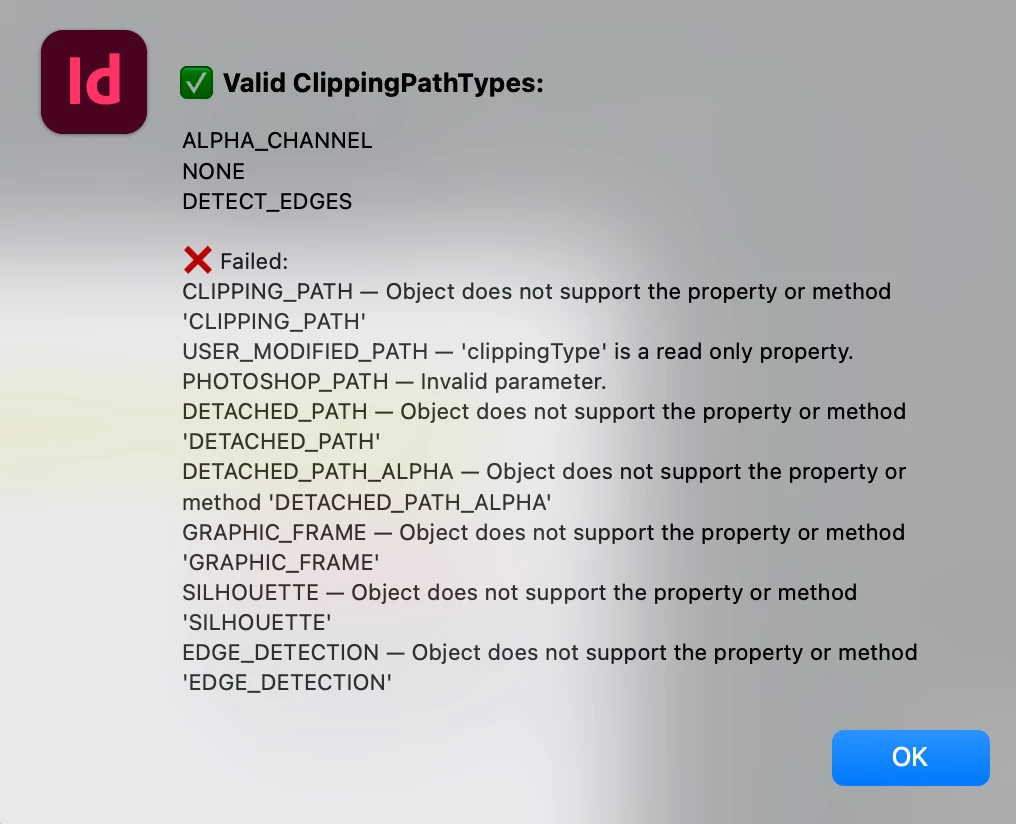
Correct answer rob day

But after long process of trial and error finally got to conclusion that ClippingPathTypes:PHOTOSHOP_PATH is not getting recognised.


Hi @Manjunath25609062caqe , Also, in case you don’t know about it, here is a very usfull ID ExtendScript API:


https://www.indesignjs.de/extendscriptAPI/indesign-latest/


image:

https://www.indesignjs.de/extendscriptAPI/indesign-latest/#Image.html


clippingPathSettings:

https://www.indesignjs.de/extendscriptAPI/indesign-latest/#ClippingPathSettings.html#d1e324282


clippingPathType:

https://www.indesignjs.de/extendscriptAPI/indesign-latest/#ClippingPathType.html#d1e80214


2 replies

rob day
Community Expert
rob dayCommunity ExpertCorrect answer
Community Expert
June 29, 2025

But after long process of trial and error finally got to conclusion that ClippingPathTypes:PHOTOSHOP_PATH is not getting recognised.


Hi @Manjunath25609062caqe , Also, in case you don’t know about it, here is a very usfull ID ExtendScript API:


https://www.indesignjs.de/extendscriptAPI/indesign-latest/


image:

https://www.indesignjs.de/extendscriptAPI/indesign-latest/#Image.html


clippingPathSettings:

https://www.indesignjs.de/extendscriptAPI/indesign-latest/#ClippingPathSettings.html#d1e324282


clippingPathType:

https://www.indesignjs.de/extendscriptAPI/indesign-latest/#ClippingPathType.html#d1e80214


Participant
June 29, 2025

@rob day Thanks for these! 

m1b
Community Expert
Community Expert
June 29, 2025

Hi @Manjunath25609062caqe here is a little demo script that may help. Let me know how you go.

- Mark


/**
 * @file Apply Random Clipping Path.js
 * 
 * Demonstration of applying photoshop clipping path to an image.
 * 
 * @author m1b
 * @version 2025-06-29
 * @discussion https://community.adobe.com/t5/indesign-discussions/clippingpathtypes-photoshop-path-not-recognised-in-indesign/m-p/15393617
 */
function main() {

    var doc = app.activeDocument,
        item = doc.selection[0],
        image = item.graphics && item.graphics[0];

    if (item.hasOwnProperty('clippingPath'))
        image = item;

    if (
        !image
        || !image.hasOwnProperty('clippingPath')
    )
        return alert('Please select a graphic and try again')

    if (0 === image.clippingPath.photoshopPathNames.length)
        return alert('Image has no paths available.');

    // get name of one of the image's clipping paths randomly
    var pathNames = image.clippingPath.photoshopPathNames,
        name = pathNames[Math.floor(Math.random() * pathNames.length)];

    // apply that path
    image.clippingPath.appliedPathName = name;

    alert('Applied clipping path "' + name + '".');

};
app.doScript(main, ScriptLanguage.JAVASCRIPT, undefined, UndoModes.ENTIRE_SCRIPT, 'Random clipping path');
Participant
June 29, 2025

@m1b Thank you, with the script logic you shared i was able to modify and land on the use case that i needed. Much appreciated!